Basecamp 2 Reviews
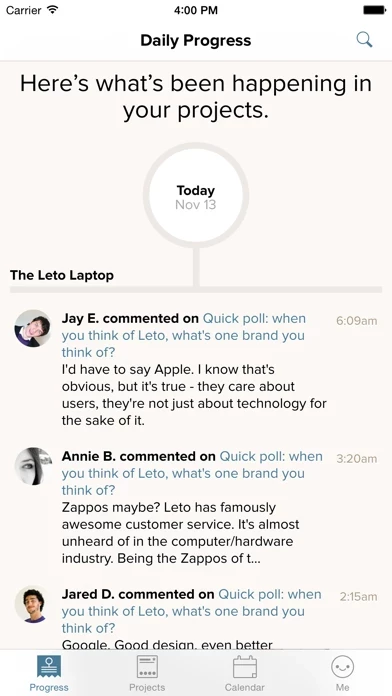
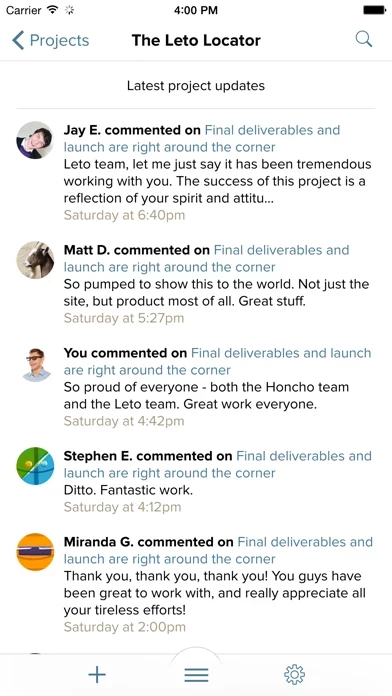
Published by 37Signals LLC on 2026-03-12🏷️ About: The official app for Basecamp 2 Check in on your projects from anywhere. Basecamp 2 for iPhone shows you the latest news on each project.

🏷️ About: The official app for Basecamp 2 Check in on your projects from anywhere. Basecamp 2 for iPhone shows you the latest news on each project.
We Investigate the app owner's website (Basecamp.com), verify their legitimacy, and uncover hidden scams and complaints.
- Helps users keep up with products created within projects
- Can do everything on the app that can be done on the website
- Great for keeping in contact with wedding consultants and keeping things organized
- Makes it easy to work with virtual assistants
- Streamlines communication breakdowns into one chokepoint funnel
- Real-time access and situational awareness of production schedules, product questions, files, data, graphic art, and music editing management
- Easy to add new projects and archive old ones while keeping everyone on the same digital page
- Allows for photo and video uploads to show up in the perfectly spaced area in which you can correspond
- Syncs with other apps like Salesforce
- Efficient and professional way to keep track of bugs and other issues with software development
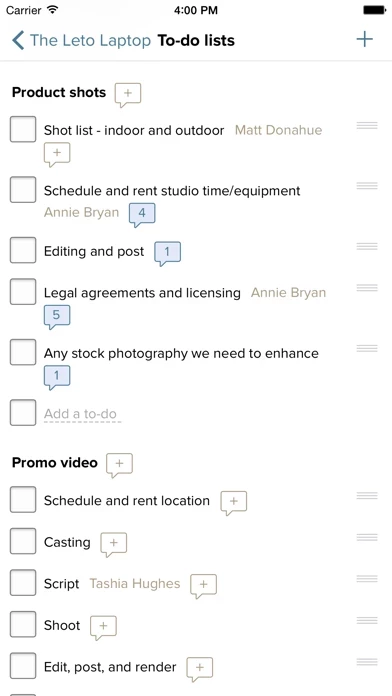
- Time-stamped discussions and to-dos make task management easy
- Easy to use on the go with iPhone or iPad
- Dictation feature makes posting and commenting faster
You can’t change or adjust any of your account settings on Basecamp2. Super inconvenient. I was away from home and kept on getting bombarded by email notifications every 2 seconds because I was unable to change email settings on Basecamp2. Just use group me. Basecamp2 is terrible
Im using an ipad mini. Upon login, the Login fields get covered by the tiny keyboard display and it is not possible to see what is being typed. The keyboard also appears at 90 degrees to the login fields. After logging in, Basecamp2 is tiny, and does not reorient to landscape. There's a "2x" option, but all this does is blow up the small display and maintwin the limited width, also text gets cut off. its pretty useless. I'll stick with the web site. I have tried their mobile app in the past, and this one is not an improvement. Basecamp2 has far fewer features than the site, and I never understood that. Why bother with an app if all it does is give you less?
To be fair, I am a Basecamp fan. Basecamp2 does not deliver any additional value in my opinion, I would advise skipping it. If they come out with one that delivers the same features as the web app without the usability problems, I would consider it again.
Needs notification system linked to phone.
Great for use with teams. However, you have to login to Basecamp2 (phone) every time.
I've been using base camp for at least three years, and I've used Basecamp2 as long as I can remember. It makes checking in on projects so much easier. I also like the updated look, and the functionality is a little bit easier too. But I really wish that they would bring back the way that you could see what was going on in the discussion while you were typing your response. The way they changed it now, the new comment opens up in a new screen without being able to see the previous posts. This is frustrating for me because sometimes I can't remember every question that was asked, or all the things I need to address. So I've been doing a lot of back-and-forth. I hope they change that soon. It was my favorite feature about the previous version. But it still deserves four stars!
Using bc for the first time as a member of a volunteer organization who's end product is an annual 3 day festival with various shoulder events throughout the year.
It's great! The only thing that would make it better would be the option for a spreadsheet document (like the text document option).
Text documents are harder to keep up with when organizing certain things. You can use google docs, but you have to open the file before you can see it. I would like to see the info cleanly organize in a spreadsheet document without having to open it.
All around, a really brilliant tool. :)
I have everything in base camp classic and couldn't do without it! Would like to be able to use some of the features the latest version provides; however, the new version does not allow you to use the same interface that our clients are used to (easy to use tabs, custom color scheme, ability to quickly post a new message).
Plus, with over 100 clients, requiring a thumbnail for each project instead of a text link with sub categories for their different businesses, isn't as convenient. The newer version is more text based and is missing the overview page showing everything across-the-board quickly for the latest changes in each project. Perhaps they could have an option in the new version for the color scheme and text based listings
Basecamp 2 is a solid app but is missing some bells and whistles of Basecamp 3 including the text editor, assigning multiple people to a task, start/end times, multiple days for a task, automatic check ins, and a congruent view between the mobile/desktop layout. However, Basecamp 3 is missing some key features of 2, including mobile notifications, a week/month calendar view, integrations (like Gnatt charts), and has issues syncing with iCal. So given the lack of features/integrations with 3 we are currently sticking with 2. Both Basecamps have fantastic layouts that are easy to use/learn.
To Basecamp: if you guys could include all the features/integrations from 2 along with other features/integrations from platforms such as Wrike/Trello then you guys would be a 6 out of 5. Cheers!
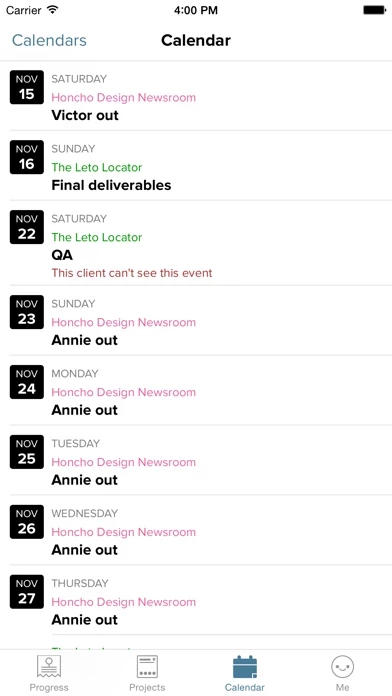
Basecamp is vital to how we operate our business. We could not manage so many multi-faceted simultaneous projects without. But it's INSANE that the mobile app offers no access to the Calendar. Think about it. Mobile. I'm out of the office, and a client or prospect says "can you meet with me next Thursday?" What do I have to do in order to check my calendar? The Basecamp app? No. Go to Safari and pull up the web-based mobile version? Not there either. I have to scroll down really fast in the Safari window and catch the "Standard View" link before the page expands with more projects (Tip: Get to that page then save a link to your iPhone's home screen.)
I would dare say the ability to check and add items to your calendar remotely is one of the most important interactions a person has with their management tools. And the Basecamp Calendar is awesome when on the desktop. Why is it still missing from the mobile app?
I wouldn't be so irate if I wasn't so passionate about Basecamp and what the entire suite of 37Signals products brings to our organization. Please, guys, fix this major flaw.
Makes it very easy for me to work with my VA
I have liked all the projects that of come out of 37 signals however I would have to say Basecamp is by far my favorite.
There are many good project management solutions out there however for myself and my colleagues Basecamp really does everything we needed to. He allowed us four photo uploads even video uploads to show up in the actual perfectly spaced area in which you can correspond. I use this with salesforce and a few other apps that all synced together. The end result is something spectacular. I cannot recommend it highly enough if you have more than one person or even yourself working on a project and you want to let your client know out and the people you're working with know what's going on so you do not risk the you said I thought you said this or I did not know that was said incidents that can sometimes happen everything is right there on the screen you can use the calendar and the only thing I'd say I don't like is I can't find the API key very easily however I know it exists
We like it
I first started using Basecamp because I have an overseas contractor who I collaborate with on projects. We are often not available during the same hours, and needed a way to keep track of all the projects that we were working on. Basecamp has been the answer to my prayers! I am able to easily keep track of all conversations and documents relating to each project that we work on.
I more recently started using Basecamp as a way to keep track of all discussions with my clients relating to the projects that we are working on. It is a very efficient and professional way to keep track of bugs and other issues with the software that I develop. Rather than having a bunch of emails, all of the discussions that we have are easily found in one place.
Basecamp is extremely easy to use and is very full featured, especially for the price that I pay. I am absolutely thrilled with it, and wouldn't think of using anything else.
Simply put, if you run a business that involves multiple employees working on the same projects, you're foolish if you do not utilize Basecamp. As a service-based company, we are beginning to rely so heavily on Basecamp. From time-stamped discussions and to-dos to task management with ease of use, Basecamp is a home run hit! We're less than a month into our company-wide usage (which has still cost us not a cent to this point) and I couldn't imagine not having a project management tool like this.
If you absolutely fight using Basecamp2 at first, great! You should. Just as with everything that improves your life, it requires an investment of time by all users, as Basecamp2 will prove useless otherwise. From the iPhone app to the iPad app and even the webpage access, our level of satisfaction is unmeasurable to this point! Nice work, Basecamp.
Love the Basecamp app. It's easier to use than desktop (PC) sometimes because I can take quick screenshots on iPhone or iPad and attach them as images to my Basecamp To-Dos and comments. Also, I like dictating my posts and comments - so much faster than typing on the keyboard.
37 Signals has done an excellent job with Basecamp2 and they're a great company in general. Have never had an issue with the iPad or iPhone Basecamp apps and I really like all the functionality. It's so easy to get work done on the go using Basecamp2, not having to go onto a mobile browser like Safari and pinch and zoom through the full site (which is required from other project management apps because their mobile versions are lacking key features). Not Basecamp though!
I've been using project management applications for years in the construction industry. The number one enemy of project management applications is adoption in your company. And it's not hard to see why a lot of that technologies are not adopted there too difficult to use they have too many confusing options that don't apply and you are unable to turn them off. The beautiful simplicity of this program is allowing me to run construction projects more smoothly and also run my vacation rental management company, all in the same application. If you've been frustrated by overly complicated project management applications that have a ton of great features but are too confusing for your staff to learn, and they keep going back to email, this is your solution!
Have greatly enjoyed Basecamp2 on my iPhone. Helps me keep up with products created within projects. Can do with app what I can do on website.
Basecamp2 was great for keeping in contact with our wedding consultant and keeping things up to date and organized.
Good system.
After multiple attempts at communicating with emails, text messages, voicemails are independent record label decided to give Basecamp a try. It completely streamlined our former communication breakdowns into one awesome chokepoint funnel, giving us real-time access and situational awareness of production schedules, product questions, files, data, graphic art and music editing management. We appreciate the layout of the template and how easily it is to add new projects and to archive old ones while keeping everyone on the same digital page.
As an independent record label producer, one improvement might be to improve the ability to listen to MP3's with a more advanced MP3 player. The existing one is "OK" but for one hour long recordings, it would be great if we had a more elaborate MP3 playback player to view audio recordings on that allowed us to see minutes and seconds in order to take better track edit notes inside Basecamp.
We love Basecamp and it certainly has improved our productivity! Five gold stars and two thumbs up for Basecamp!
Basecamp 2 for iPhone does not appear safe based on available data.
JustUseApp Safety Score for Basecamp 2 is 10.8/100.
This assessment is based on our NLP analysis of 42 user reviews.
Combined with the app store average rating of 3.8/5.
Basecamp 2 for iPhone does not appear legitimate based on our analysis.
Our NLP models processed user feedback to estimate legitimacy. JustUseApp Legitimacy Score for Basecamp 2 is 10.8/100 .
This conclusion is based on analysis of 42 user reviews.
Basecamp 2 collected the following data from you:
NOTE: This app requires requires an account on Basecamp 2 (released March 2012) or Basecamp Classic.
Basecamp 2 for iPhone shows you the latest news on each project.
• View progress as team members complete to-dos and upload files.
• Everything from your projects is available, so you can refer to a document or make a decision no matter where you are.
• Jump in on a discussion and post your thoughts.