Twindo (formerly Canvas) Reviews

Twindo formerly Canvas Reviews

Published by on 2026-04-28

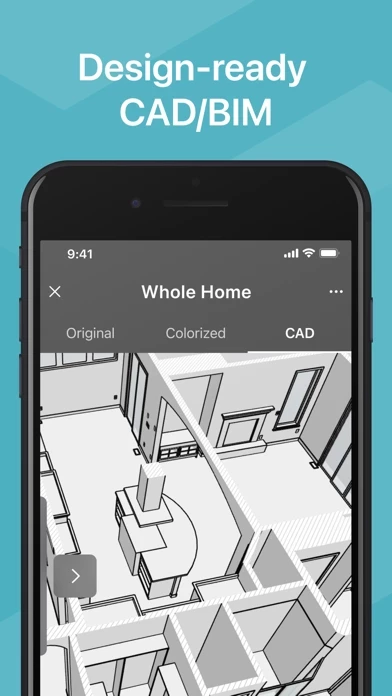
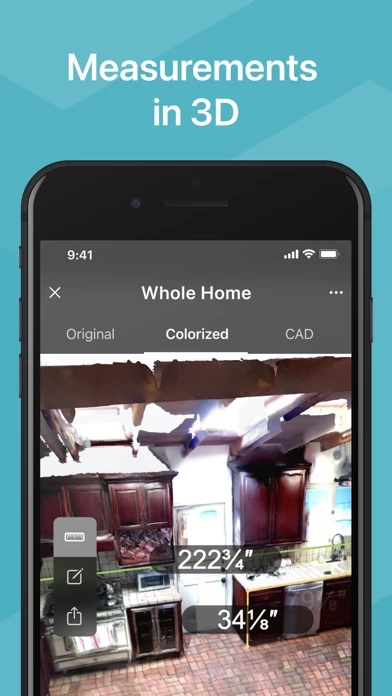
🏷️ About: Canvas is a home improvement app that enables professionals to 3D scan spaces in minutes and get accurate as-built CAD models and floor plans. The app uses computer vision and AI to create accurate 3D digital twins of rooms and entire homes. Canvas is trusted by thousands of home improvement professionals, including design-build firms, kitchen and bath remodelers, general contractors, architects, and interior designers. The app requires a LiDAR-equipped iOS device, such as an iPhone 12 Pro / Pro Max or iPhone 13 Pro / Pro Max or an iPad Pro (2020-2021 models).


Is Twindo formerly Canvas Safe to Use?

We Investigate the app owner's website (Canvas.io), verify their legitimacy, and uncover hidden scams and complaints.


Overall Customer Experience 😎


🤬 Negative experience
66.8%

😎 Positive experience
33.2%

🫥 Neutral
0.0%

~ from Justuseapp.com NLP analysis of 1,062 combined software reviews.

Is Twindo formerly Canvas Safe?
Twindo (formerly Canvas) appears generally safe, but use with caution.
33.2/100

  Safety Analysis »»

Is Twindo formerly Canvas Legit?
Twindo (formerly Canvas) appears legitimate, though exercise caution.
33.2/100


Summary of Customer Reviews (Takeaways): 💎

- Almost replaces hours of measuring on your knees and then even more hours of as-built 3d modeling.

- Accuracy is sufficient for planning and quoting.

- Chief Architect files are very detailed and delivered even faster than advertised.

- Easy to use, saves time and money.

- Makes it extremely fast to capture measurements and create as-builts.


Read 22 Customer Service Reviews 😠💢

4.8 out of 5
Cost.

It’s not a bad program at all but you really can’t do anything but scan your house or what ever then get a list of formats that charge a top competitive business prices per square foot. Sure looked like a free app and technically is is but useless without spending money lol. Just my opinion.

Great app needs improvement

So far Twindo has worked great! However an update I would like to see is Apple Pencil support. When trying to start measurements using your finger it doesn’t get it exactly. I tried using my Apple Pencil but it just moves the entire scan and doesn’t allow for dotting the starting point.

Purchased LiDAR iPad just for Canvas. Worth it!

A must-have for any contractor! I wish I found Twindo before, it almost replaces hours of measuring on your knees and then even more hours of as-built 3d modeling. Scanning has a learning curve but is still pretty easy. Accuracy is sufficient for planning and quoting but you’ll definitely want to verify key measurements with a tape measure or a laser before ordering materials and installation. Chief Architect files are very detailed and delivered even faster than advertised – usually in 1-2 days.

Snappy performance, excellent accuracy

My wife and I are in the process of remodeling our new home. Our contractor showed us this magical app to help us plan the changes we intend to make collaboratively. So neat and useful!

DIY CAD files!

I’m working on a home addition and the simplicity with which I can get accurate CAD drawings is incredible. My designer was also impressed with this tech.

Getting hours of my life back.

Measuring my clients’ houses was not why I became an interior designer. Twindo takes care of that for me so that I can actually focus on designing.

Why aren’t you using Canvas already?

Bought my iPad specifically for Canvas and it has been one of the best decisions I’ve made as a business owner. The Canvas team helped me at no extra cost, to fix a rookie mistake I made, because it was my first scan. What other company will do that for you? From then on, I knew we were in good hands. Twindo works like it’s supposed to, easy to use, saves time and money….Just download it and start using it already, then thank me later.

What a great tool.

As a REALTOR, accurately measuring homes and producing readable Floorplans is an essential part of my daily practice. This tool is the easiest I’ve found. We use 3-D renderings on each listing. I will be using it daily.

Incredible time saver

What used to take hours with a tape measure or laser distance measurer I can do in minutes. The CAD file I got back is great and came back in less than a day.

Best way to put your home in your pocket

Easy to use and then you have every measurement in your house at your fingertips. If I were a contractor I’d buy iPads for the whole crew.

Where have you been all my life?

I’ve probably wasted months of my life measuring houses and modeling as-builds. I wish I had heard of Twindo sooner!

A helpful tool

Once you play around with a bit and learn it, Twindo can be extremely useful for helping with a variety of design projects.

Easy!

This has made capturing existing conditions easy. It takes minutes now. I get an as built back in Revit and under a day without having to crawl on my hands and knees.

Fastest way to take field dimensions

I didn't know what I could use LiDAR for measurements until I found out about Twindo. Now I bring it everywhere. Fastest way to get measurements and site info and captures way more than I would on my own.

Magic

How did I not know Twindo existed? I used to spend hours tediously taking measurements to generate a 3D model. Canvas does all the measurements for me in minutes and gives me a 3D model in SketchUp a day later. Customer support is very quick and responsive too. If you're a contractor you have to have this in your toolbelt.

Impressive! Turns a video of the space into a SketchUp file

I was amazed that you can basically walk around the room and take a video using Twindo, and it turns the video into a SketchUp model. The level of detail of this model is even higher than if I would have done it myself. Awesome tool for interior designers, architects and GCs!

So happy

I’m so happy I found Twindo. I didn’t become an architect to crawl around and take measurements. Now Canvas does all the dirty work for me. It took me a while to get the hang of exactly how to scan and where to stand, but once I figured it out getting a model is so easy. Taking the scan of the whole house takes about 20 minutes, then I got the model back in less than a day. Really happy I found Twindo!

Such a helpful tool for DIY

We are planning a total gut and renovation of two bathrooms in an old home with lots of quirky spaces. My friend who is an interior designer recommended Twindo and it’s so awesome. I had been taking measurements and trying to sketch out plans on a legal pad and it was not working out. Twindo made planning out the redesign so much easier! Everything is perfectly measured and tracked. I could spend hours playing around with it and it brings life to my vision.

Amazing tool for architects and designers

Twindo makes it extremely fast to capture measurements and create as-builts. What used to take me hours or even a full day now takes minutes to capture, and I don’t have to do any drafting or modeling. I just get an email within a day or so with a SketchUp model that’s ready to use (and they offer other formats too). Especially on bigger projects, it’s faster than I would do on my own and definitely way cheaper.

How did I remodel without it??

Twindo is a game changer. I needed to show the contractor what I had in mind for the design in the garage, and this made it so simple. Not sure how I made do without this! This will be my go-to for future remodels *for sure*!

A well built app

It’s clear the Occipital team put a lot of love into Twindo.

The on device scanning is nice (and free), but the ability to go from a quick scan of a space to a ready to use CAD file is game changing.

Game changer

I was always jealous of the AEC firms that could afford laser scanners and BIM technicians… I just couldn’t afford it as a residential remodeler. Now I can basically do the same thing with my iPad. My clients think it’s cool when I scan their houses. I think it’s cool that I don’t have to spent a day in Revit building an as-built.


Is Twindo formerly Canvas Safe? 🙏

Twindo (formerly Canvas) appears generally safe, but use with caution. JustUseApp Safety Score for Twindo formerly Canvas is 33.2/100.
This assessment is based on our NLP analysis of 1,062 user reviews. Combined with the app store average rating of 4.8/5.

Safety Analysis

88.8% of users say app is safe 👍
88.8%

7.4% of users have some concerns ⚠️
7.4%

3.8% of users say app is risky 🚨
3.8%


Is Twindo formerly Canvas Legit? 💯

Twindo (formerly Canvas) appears legitimate, though exercise caution. Our NLP models processed user feedback to estimate legitimacy. JustUseApp Legitimacy Score for Twindo formerly Canvas is 33.2/100 .
This conclusion is based on analysis of 1,062 user reviews.

🔏 Privacy & Data Safety

Twindo formerly Canvas collected the following data from you:

  • Data Linked to You:
    • Financial Info
    • Contact Info
    • User Content
    • Identifiers
    • Usage Data
    • Diagnostics
  • Data Not Linked to You:
    • Diagnostics


How was your experience with Twindo (formerly Canvas)? Post a Review


Features

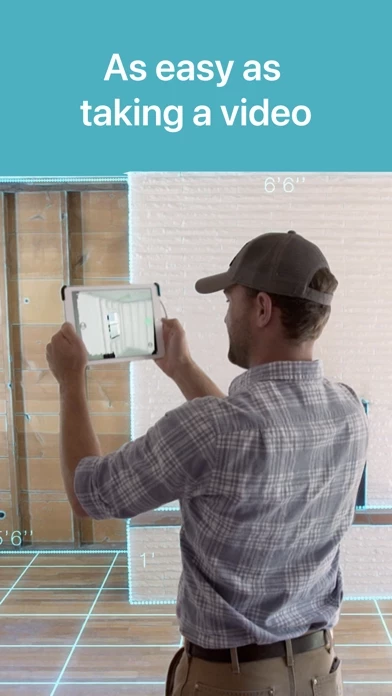
- 3D scanning: Canvas enables professionals to scan rooms in seconds and entire homes in minutes, replacing tedious measuring with 3D scanning that is as easy as taking a video.

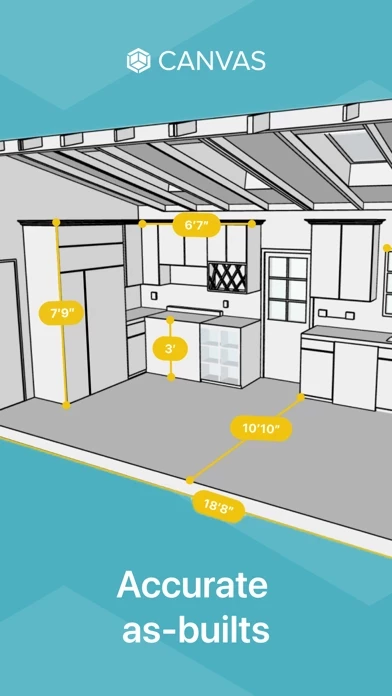
- Scan To CAD service: Canvas offers a Scan To CAD service that transforms scans into editable, professional-grade 3D CAD/BIM files and 2D drawings in as little as one day. The service creates as-builts in industry-standard formats like Revit, SketchUp, Chief Architect, and 2020 Design Live, as well as 2D floor plans in AutoCAD and PDF.

- Accurate measurements: Canvas allows users to measure with up to 99% accuracy and view their 3D model from any angle.

- Canvas Web Viewer: Users can revisit their 3D model any time, in-app or via the Canvas Web Viewer on any device.

- Time and cost savings: Canvas saves professionals hours and thousands of dollars. Customers have reported saving approximately $1,500 on measuring and modeling their home and reducing the time to measure a 2,500 square foot building from 2 hours of measuring and 1.5 hours of data input to 30 minutes of scanning and sending the scans to be converted to a Revit model.

  Contact Support
Developer:
Occipital, Inc.

Contact e-Mail:

Website: