Bitwarden Authenticator Reviews

Bitwarden Authenticator Reviews

Published by on 2026-05-07

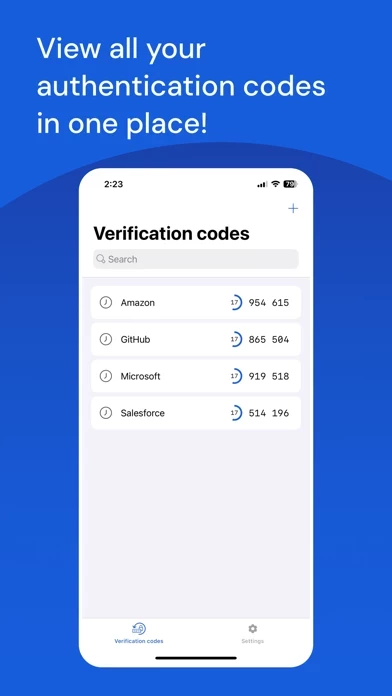
🏷️ About: New from Bitwarden, provider of the password manager trusted by millions, Bitwarden Authenticator generates verification codes for two-factor authentication, ensuring your identity is verified when you log into accounts. Using industry-standards, Bitwarden Authenticator supports any website or application that uses TOTP.


Is Bitwarden Authenticator Safe to Use?

We Investigate the app owner's website (Bitwarden.com), verify their legitimacy, and uncover hidden scams and complaints.


Overall Customer Experience 😎


🤬 Negative experience
96.1%

😎 Positive experience
3.9%

🫥 Neutral
0.0%

~ from Justuseapp.com NLP analysis of 93 combined software reviews.

Is Bitwarden Authenticator Safe?
Bitwarden Authenticator does not appear safe based on available data.
3.9/100

  Safety Analysis »»

Is Bitwarden Authenticator Legit?
Bitwarden Authenticator does not appear legitimate based on our analysis.
3.9/100


Read 19 Customer Service Reviews 😠💢

3.4 out of 5
just another TOTP

just another TOTP app nothing special. cant even do steamguard

Use caution export/import

I did an export of my bitwarden vault and then import into Bitwarden Authenticator. It dropped 3 accounts without even warning. I caught this by manually counting how many entries were in Bitwarden Authenticator and realized I was 3 short. After hours of comparing I found the 3 missing and noticed all 3 had spaces in the TOTP key. Although these TOTP entries work in Bitwarden password manager, they did not transfer over using the export/import feature. There should be a confirmation as to what was a success and what was failed. Yikes!!! If anyone would have done this and then wiped out their original source of where the TOTP codes were kept they would be locked out of these accounts!!

stored in iCloud

I hope it can be stored in iCloud "after encryption" and synced. Additionally, I would like to set my own PIN code.

Search doesn't work

If you search for a website, it's codes will always be 123 456. Which isn't helpful. It looks like this is fixed upstream on GitHub for some time now.

Search is Broken

Try searching. All codes go to 123 456...

Good, but needs fixes

As others have pointed out, the search functionality is currently not usable, as the code for each search match will display as “123 456”.

Additionally, whenever TOTP codes renew, the sort order changes for me. This forces me to do a manual refresh (drag/pull down) to get the entries back in alphabetical order, as I have well over 40 entries, which makes the correct entry difficult to find due to the broken search and random sort after code renewal.

Likely to Be Excellent!

(Minor bug at the end. NOT a security issue.)

~Leaving 3 stars *temporarily* for now only because:

• Only very recently switched after learning about Authy’s latest MASSIVE breach (worse than 2022) that occurred as a result of a careless mistake that should have never happened with a company developing a 2FA app. (33 Million phone numbers were scraped by exploiting an unsecured API endpoint.) Twilio is not primarily a security company like BW is. Twilio merely acquired Authy from another developer.

• Still in the process transferring keys to BW Authenticator and have not had enough time to use and test in order to give it 5 stars with any certainty. So far, no major issues, and no vulnerability or security issues I have noticed or am currently aware of.

• Security through obscurity as BWA builds their user base, giving them time to fix any *potential* vulnerabilities. I am in NO way implying any exist. I am currently not aware of any, nor have I noticed any with the relatively little use I have had so far.

• (High praise) While I am aware of 2FAS, and its high ratings, I am not at all familiar with them like I am with BW. Authy also once had 5 stars. Not throwing any digs at 2FAS. I personally am just not familiar enough with them and already use and trust BW.

~High Praise~
I have used Bitwarden’s password manager for years without issue, and I have the utmost respect for them. They are primarily a security company, unlike Twilio.

BW’s integrity speaks volumes, given the quality of their password manager and their incredibly reasonable price point. (Much of the functionality most people would ever need is already available for free). I was happy to pay the $10/year, regardless. They absolutely earned and deserve it.

Plus, there ARE a few premium features worth having (for their PM) for the more security-conscious individuals. The price very clearly comes from the additional overhead required to maintain these features. I am always happy to support devs with integrity who are building quality products, given how rare that is becoming. Even if I didn’t use any of the extra features, I still would have paid the $10 just to support the team. ♥️

🦟🪳🦟
~Likely bug, but not a vulnerability issue
There is a minor issue I came across that in no way affected this review or poses any security threat as far as I know. I just wanted to bring it to the dev team’s attention while I’m here (as well as anyone else having the same issue):

When pasting keys that have spaces in them, BWA throws an error saying something like “Key cannot be read,” requiring one to manually delete the spaces in order to get it to save.

This feels like a bug since the error doesn’t explain what the issue is, but it may be by design due to potential security vulnerabilities I am not aware of when it comes to copying/pasting keys manually. So I’m not going to make any assumptions and instead let the devs respond to what the issue is.

Good start but needs more TLC from devs

The import/export/backup options have been added so no glaring issues there at the moment. BitwardenAuthenticator is pretty no frills as far as 2FA authentication apps go—and while that’s generally seen as a positive in the Bitwarden community— BitwardenAuthenticator looks rushed out the door rather than elegantly simple. Personally one thing I NEED is icons/logos for the myriad of services with 2FA out there… the UI is a wall of text at the moment.

I have faith in Bitwarden to make BitwardenAuthenticator as great as the main one by listening to the community & soliciting feedback.

Needs a bit more work but I trust BW

Needed a new 2FA app after Raivo got sold. Already using Bitwarden so I know the company is good. Wish it required Face ID every time it opened. If someone unlocked my phone they’d be able to see my codes unless I fully close BitwardenAuthenticator .

Ok, but

TOTP is provided with bitwarden premium. Is that free now, or $10 for the one-app experience? If I have codes set up here, will they import to bitwarden premium, or do I have to re-add all the sites?

Needs improvement

It has a lot of potential but is not perfect. You can’t search by any field. I often search by username. You also can’t reorder items. And a big problem is that it only shows a small portion of the account name. I have probably 70 accounts in mine, and many appear with the exact same name by default.

The two things I really like about it are that each entry only takes up a small amount of space on the screen, and that I can import from other authenticators.

Backup Doesn't work

I got a new iPhone this past weekend and migrated the data from the old phone to the new. The data in BitwardenAuthenticator did NOT restore. Thankfully the Apple store rep hadn't wiped my old phone yet and I was able to export and import the data. But, if he had wiped that phone, I would have been in a world of hurt. Between that and the lack of handoff, i'm losing faith in BitwardenAuthenticator .

Needs Sync

Would love to use this and have it sync with the TOTPs that are already in my Bitwarden account.

A Good Start

I really want to like this, but it lacks the ability to import tokens from other authenticators.

Decent Replacement for Raivo

Came to BitwardenAuthenticator from the Raivo debacle. Had no issues with it and I trust the Bitwarden brand. Has backup to json, and import from several other authenticator apps.

Happy to see an Authenticator app by this company

Apple watch compatibility would be awesome!

Cross-platform, open source, private iCloud backup

This isn't the first cross-platform open source TOTP app with iCloud backup support, but it has a great roadmap and is privacy-first... so it will be the only TOTP app I may ever need if they add push login, account recovery, and vault sync. I'll use this until the Passwords app in iOS/iPadOS 18 is released, plus it's a great tool for users on older devices that can't install iOS/iPadOS 18.

Deserves more stars

It does everything you need and nothing you don’t. It looks nice enough. It’s backed by a solid, trustworthy company. Can’t ask for much else!

Love the App

Love BitwardenAuthenticator !


Is Bitwarden Authenticator Safe? 🙏

Bitwarden Authenticator does not appear safe based on available data. JustUseApp Safety Score for Bitwarden Authenticator is 3.9/100.
This assessment is based on our NLP analysis of 93 user reviews. Combined with the app store average rating of 3.4/5.

Safety Analysis

51.2% of users say app is safe 👍
51.2%

26.8% of users say app is risky 🚨
26.8%

22% of users have some concerns ⚠️
22%


Is Bitwarden Authenticator Legit? 💯

Bitwarden Authenticator does not appear legitimate based on our analysis. Our NLP models processed user feedback to estimate legitimacy. JustUseApp Legitimacy Score for Bitwarden Authenticator is 3.9/100 .
This conclusion is based on analysis of 93 user reviews.

🔏 Privacy & Data Safety

Bitwarden Authenticator collected the following data from you:

  • Data Linked to You:
    • Contact Info
    • Identifiers
  • Data Not Linked to You:
    • Contact Info
    • Diagnostics


How was your experience with Bitwarden Authenticator? Post a Review


Features

Bitwarden Authenticator uses industry standard methods for verification code generation, so it will work with any website or application that utilizes time-based one-time passwords.

New from Bitwarden, provider of the password manager trusted by millions, Bitwarden Authenticator generates verification codes for two-factor authentication, ensuring your identity is verified when you log into accounts.

Using industry-standards, Bitwarden Authenticator supports any website or application that uses TOTP.

Generate verification codes to ensure your identity is verified, keeping your sensitive data out of reach of imposters.

Bitwarden empowers organizations to secure passwords, developer secrets, and passkeys.

  Contact Support
Developer:
Bitwarden Inc

Contact e-Mail:

Website:

Privacy Policy: