Dell Mobile Connect Reviews

Dell Reviews

Published by on 2021-07-17

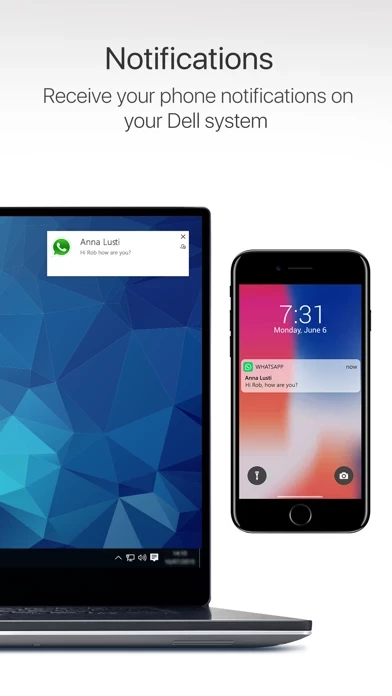
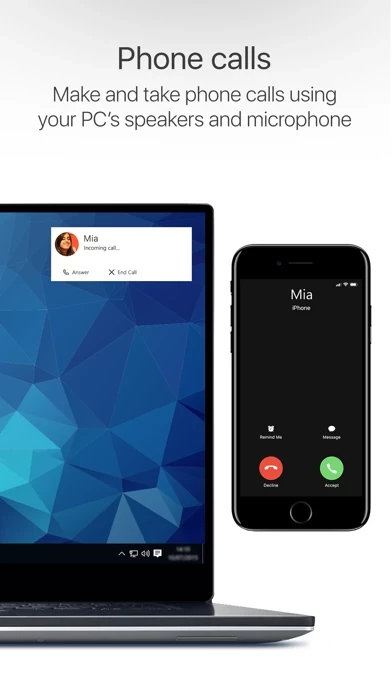
🏷️ About: Dell Mobile Connect minimizes distractions by allowing you to make calls, send texts, get notifications, transfer files and control your phone conveniently from your Dell computer. Put your iPhone away and use it through your computer’s screen, touch, mouse or keyboard! Features: • Hands-free phone calls – Make and take phone calls using your PC’s speakers and microphone.



Is Dell Safe to Use?

We Investigate the app owner's website (), verify their legitimacy, and uncover hidden scams and complaints.


Overall Customer Experience 😎


🤬 Negative experience
70.6%

😎 Positive experience
15.4%

🫥 Neutral
13.9%

~ from Justuseapp.com NLP analysis of 190 combined software reviews.

Is Dell Safe?
Dell Mobile Connect does not appear safe based on available data.
17.9/100

  Safety Analysis »»

Is Dell Legit?
Dell Mobile Connect does not appear legitimate based on our analysis.
34.1/100


Read 23 Customer Service Reviews 😠💢

3.3 out of 5
Dell left this in the dust

I’ve updated Dell on my phone as well as my PC. As soon as I wanna send a text or call from my laptop it just gives me an error. Even though my phone is connected and went through the Bluetooth settings to turn on contacts and notifications.

Contact Permissions Issue

Cant get past install prompts because no option in iOS settings to give mandatory permission to view contacts. No option in Dell settings and in the privacy->contacts settings Dell is not showing up as requesting contact access.

Amazing if it worked with iOS 13.4

This would be amazing, and it was for 1 day when I had iOS 13.3.1 but as soon as you update to 13.4 with real mouse support it breaks the mouse in this app connect. Please fix. Thx.

Useless

this app abandoned users of slightly older machines.

Doesn't Work

Tried pairing 17 times with my iPhone 8+ that has iOS 13. I keep getting bluetooth pairing errors within the this app Mobile Connect app, even though my laptop and phone properly pair and connect with one another and can detect the other device. Only Dell seems to not recognize the proper connection. Also, having to keep my phone unlocked for messages ultimately ruins the convenience factor. App needs serious updates on both mobile and PC ends.

Not what I thought

Two MAJOR issues - you must have phone unlocked which is a major security issue and it dims the screen so each time you want to use your phone you need to go into settings to be able to see the screen. This is such an amateur effort. For the little convenience it provides, you’re leaving your phone totally vulnerable. If you lose or get it stolen, they will just wipe it with it unlocked and have a nice new phone.

Confused

I don’t really see a point in this if you still need to have your phone open... it would be better if I could set my phone away and use the laptop for everything without my phone being on.

Another issue is I don’t receive any of the msgs, I can send but the replies don’t come on the laptop, only the phone.

Good App, kinda annoying features

The concept is great! I’ve always wanted to get messages and notifications on my windows laptop although I have an iPhone. However, it is annoying that you have to keep the screen up and unlocked to send messages. The point of Dell is so I don’t have to have my phone running next to me. Again, love that these improvements to get messages are being made, but the two stars taken off are because I have to keep my phone unlocked and keep Dell open to send messages and other notifications.

Great except for one thing

Dell is a great way to check my phone without ever having to leave my PC. The only thing I would like to see added is making group messages work. Right now it just sends a group to one person in the group.

Help!

This is great when it works. Lately I’ve been having an issue ... Even though my iPhone is paired and my screen is left unlocked so my this app laptop can send and receive messages, it tells me, “Unable to get notifications from your iPhone. Launch this app Mobile Connect on your iPhone.” The problem is it IS launched on my phone, paired, my screen on my phone left on, etc. I’ve uninstalled and reinstalled Dell both on my laptop AND iPhone and I’m still having this issue. I truly do love Dell but I don’t understand why I keep having this issue when I’m doing everything correctly, just as it says to do.
If someone could PLEASE help me I’d appreciate it so much!!

UPDATE: 2 days ago they recently put out a new update and fixed the issue I was having. I’m so happy!! I changed my rating from 2 stars to 5 since the issue has been resolved.

Works great, even on older machines

First off, I got this working just fine on an older XPS laptop so you can ignore those who would rather wine than find solutions. Second, this thing actually works with iMessage on a PC! Do you have any idea how hard it is to find something that does that well? Basically this is the only good option for that I am aware of. I look forward to seeing this feature refined, and this only reinforces how pleased I am with the brand. My only ask would be working in the background, but I'm still giving the thing five stars because the naysayers don't seem to knew what they are talking about, and have apparently assumed they can't use it without due diligence.

Innovation

this app has brought Windows closer to being on par with the vaunted Apple Mac OS/ iOS ecosystem. This is much better than the Chrome web effort and Microsoft's Your Phone Companion App. I certainly appreciate all that innovation but this effort from this app outpaces them all by a fair margin. In fact, Dell does more than Apple's iMessage. That suddenly looks dated and even parochial. The competition and effort is great for productivity and all consumers.

Works very well!

I am very happy and very impressed by the functionality and by the way that it simply works. And it works well! No longer am I forced to use a Mac to do online work just because I have an iPhone. I love my iPhone but I am a Windows guy. Also, I can connect to both my Windows laptop, my Windows work PC, and My Windows gaming machine! All flawlessly! So happy I can dish the Mac now.

I’m always surprised bc: it works!

The only catch is the iOS app needs to keep running, so its ideal for when your device is charging & your using a PC.
(Considering it works with a UWP app I keep expecting either an iOS or Windows update to break it - if that’s ever happened it was fixed before I noticed).

Awesome free product

I have a XP’s 9570, 9550 and 9370. Works fine on them all with an iPhone X. Is annoying that to send texts, the iPhone app has to be open. But I get notifications without Dell open which is mostly what I use it for. I love this because iMessage is the only thing I miss from being on iOS.

Julia Allen
2022-02-17

This app does not stay connected for even a whole day. I'll go through the work of disconnecting AND forgetting the Bluetooth connection on BOTH devices EVERY morning, and by lunch it's no longer working again. Even when it's working, the audio is spotty and there are problems with it. I've had enough. It's not worth the effort. I am uninstalling it from the phone and the computer. I'll just pick up the phone when someone calls or texts me, and email photos from my phone to myself or use a cloud storage option.

Carl Bechtold
2022-02-13

Completely removed and reinstalled again today -- for the fourth time. Using Windows 11 on a seriously expensive new Dell laptop. Great idea if it would work, but I give up.

Robert Grieve
2021-12-01

I Have the Dell XPS-8940 Desktop PC that has Dell Connect. This software has been working up till now. Every time I try to run it, it displays "Dell Connect is open in another Window, use Dell Connect in this Window" I click on the link to use this Window but nothing changes. I have opened 'Task Manager' and ended all sessions of this software, tried again to run it but it reverts to the same message.

PAUL GEORGE
2021-10-23

I just bought a brand new Dell 13 xps computer. I have an Iphone 12. As some others have stated, it looks like it is connected but give me an error message when I try to reconnect that I am not connected to the network. Both devices are connected to my home network. Its is absolutely more trouble than it is worth. It would be wonderful if it worked.

Mark
2021-10-11

Awful, just awful. Super slow and rarely connects. And once it does, it doesn't stay connected. I've tried using this app since Win10 came out and it has been buggy ever since (both versions, no less.) Win8 worked flawlessly however, which is strange. That was one of the best features of Win8 and they broke it.

EJR
2021-08-12

Have a high-end Dell laptop. Had issues with Bluetooth and motherboard since purchase. After 3 Depot repairs and 8 online chat repairs, Dell finally replaced the Bluetooth adaptor and the motherboard. I am now not having any of those issues but Dell Mobile Connect is not performing as it should. No place in settings to give permissions except for notifications. If I walk away with my iPhone (v.14.7.1) the app disconnects and erases all my messages for the day. Then I have to reconnect manually to even use the app. A lot of times it will show that the phone is not connected/paired even though it is. This is a great app when it works (v4.0). The previous version (v3.3) was much better and more user friendly. This app needs a LOT of work to make it useful for daily and business use.

Martin Seebach
2021-07-11

Have Dell Mobile Connect on win 10 box. Downloaded the android version for phone. Told pc to install to phone. Sat, watched circle spin, not showing up on phone and until it gets to phone can no longer see pc from phone. Is there an assumption of cellular signal to download directly to phone?

Lisa Cooke
2021-02-05

Do they have any plans to Get Group Text Working?....Currently if you reply to group text....it just sends to one person...And on the PC screen it shows group texts as coming from and individual, Not as going from a Group....


Is Dell Safe? 🙏

Dell Mobile Connect does not appear safe based on available data. JustUseApp Safety Score for Dell is 17.9/100.
This assessment is based on our NLP analysis of 190 user reviews. Combined with the app store average rating of 3.3/5.


Is Dell Legit? 💯

Dell Mobile Connect does not appear legitimate based on our analysis. Our NLP models processed user feedback to estimate legitimacy. JustUseApp Legitimacy Score for Dell is 34.1/100 .
This conclusion is based on analysis of 190 user reviews.


How was your experience with Dell Mobile Connect? Post a Review


Features

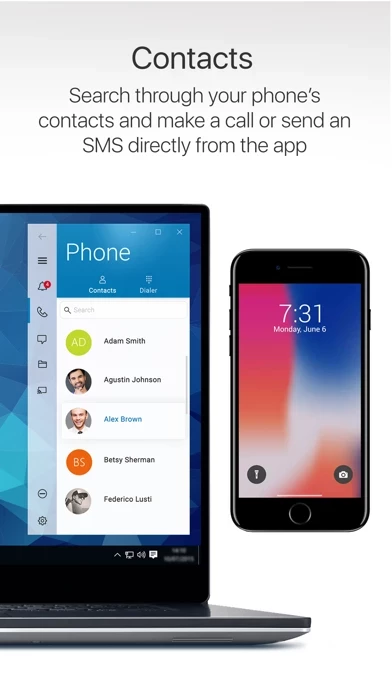
Dell Mobile Connect minimizes distractions by allowing you to make calls, send texts, get notifications, transfer files and control your phone conveniently from your Dell computer.

• Download and install the main Dell Mobile Connect application on your Windows 10 device (available on the Microsoft Store).

• Launch Dell Mobile Connect and follow the on-screen prompts.

• Notifications – Receive your phone notifications on your Dell system.

• A 2018 or newer Dell computer with Windows 10.