Campfire – Write Your Book Reviews

Campfire Reviews

Published by on 2026-03-17

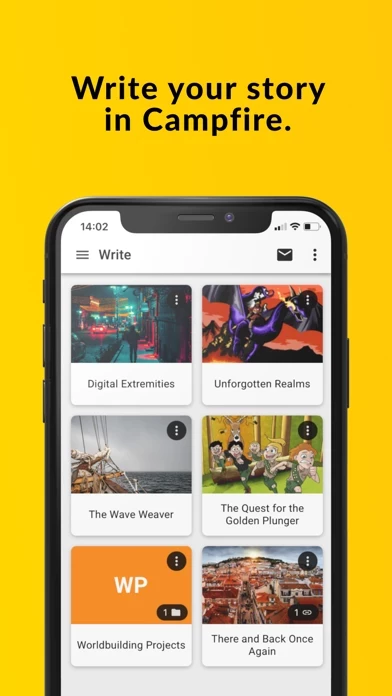
🏷️ About: Whether you want to write a book, tabletop RPG campaign, short story, or just create for fun, Campfire’s writing software streamlines the writing process to make beginning your project more efficient and staying on track easier. Campfire’s interconnected tools make for a seamless worldbuilding experience where you can quickly reference information, link story elements together, and collaborate with other users in one place.


Is Campfire Safe to Use?

We Investigate the app owner's website (Campfirewriting.com), verify their legitimacy, and uncover hidden scams and complaints.


Overall Customer Experience 😎


😎 Positive experience
66.6%

🤬 Negative experience
33.4%

🫥 Neutral
0.0%

~ from Justuseapp.com NLP analysis of 64 combined software reviews.

Is Campfire Safe?
Campfire – Write Your Book is very safe to use.
66.6/100

  Safety Analysis »»

Is Campfire Legit?
Campfire – Write Your Book looks authentic and legitimate.
66.6/100


Summary of Customer Reviews (Takeaways): 💎

- Easy to use

- No ads or distractions

- Free and functional

- Neat and organized

- Inspires ideas

- No need to pay for extra features


Read 42 Customer Service Reviews 😠💢

3.4 out of 5
Disappointment

I am really upset with Campfire. I waited a long time for it to come out and then when I found it existed I could never find it until I tried to use the mobile site today. The mobile site absolutely refuses to let you view anything being in an inspired mood I needed to access my project asap so I downloaded Campfire and it is severely disappointing. I created my project in the web browser and Mac app and I can’t see anything other than the titles of all my elements. All details are nonexistent. I cant get home for several days to verify my project is still intact so I am assuming it is just Campfire . All my descriptions, images, timelines, and relationship webs are missing. I have nothing but element titles. Really disappointing for Campfire that nothing carries over cross platform. I’m going to switch to another worldbuilding service because of this and issues I’ve had using the Mac app versus the web browser. this app is not worth it

Want to like it, but not so much

I am new to both the software and Campfire so I understand learning curve. My main issue, when I want to jot down an idea that comes to me when I can’t address it due to life and want to come back to it, I want a note pad that I can just quickly get it down before losing it. In Campfire I can see the “notepad” but when I click it the only option is to insert a tag and jump through all these placement hoops. By the time I can get to a point to start typing my idea, I am losing or lost it. Having no option to just open a text block and brainstorm or type is not effective for me. The lack of this small but powerful feature is likely the reason I will not use app as well as likely not use this app and just stay with office software.

I want to like it, but it's unfinished.

There's hardly any explanations for anything. Creating a new something always puts it as (for example) "New Character" even though you name them, so you have to manually find the way to change the name for the new character in the list (I mean, come on now...). Campfire has this AMAZING feature called "tags". It can completely transform the creative process. Problem? Once again, it's unfinished and that's unfair. I can choose from a predetermined list of TONS of occupations, but I have to manually think of... personality traits? How can you tease us with such an incredible and transformative feature to the creative writing process and then completely abandon it at its most important part? I mean, think about it. Instead of thinking about my character and having to imagine the words to describe their personality, why can't I use this awesome tags feature and scroll through a list? It's a million times easier, embraces writers by helping to form new ideas, and y'all just... kinda half did everything. I get wanting to have your app be more open so it can cater to writers of all styles, but you can't just show us a potentially brilliant feature and give us a shoddy product. I'm so disappointed. When I first saw that option of selecting from a list of predetermined items I thought I had finally found a product from someone who understands what a novelist needs... but nope.

Needs work for IpadOS

I have used the web version of this app and I like the way it lets me organize and structure elements. The problem is, it is not built for iPadOS and honestly, I wish it was. I can use Campfire on my phone, but who wants to write on their phone all the time if they don’t have access to their PC or want to write from their bed without needing to use their laptop?

please fix Campfire so it works on iPad without it displaying the screen size of a phone.

Family Tree

I had thought that the family trees would look like they do on the web version, but there isn’t an option to make them. I suppose I could use the panels to makeshift one, but that would look odd. Also, why does the timeline also look different from the web version? I thought that the mobile version of this app would mimic the look of web version. I think all tabs that need to be used are too much for my brain to comprehend (even though I use the Notes on my iPhone to write story information and stuff like that). I was going to give the mobile version a try, as I don’t want to pay for the web version of this app, but I think I’ll just stick with the method I’ve always used, which is using my iPhone Notes to organize my story information.

Mostly Helpful

I love Campfire very much! I found out about it online and I had been looking for an organization tool for awhile, so I downloaded it. It was amazing at first, but soon issues came up. The main problem is the glitching and hiccuping that Campfire does. The more information you input into a project, the glitchier it gets. If one is extremely patient it's only a minor problem, but eventually it gets to be too much. Wonderful app and idea, but it definitely needs more optimization and bug fixes before I can rate it higher.

Decent for iPhone, but iPad?…

It’s been given the instagram treatment of iPad usability. It FUNCTIONS, but it’s not FRIENDLY.

I’d like to sit down and write my thoughts onto Campfire, but sadly that’s not the case. However, I do hope their fix isn’t making it anything like the desktop app, which is just a rip-off of their website. The desktop app works fine, but is clunky. The mobile app is much more seamless, but is missing vital features/shrinks a little too much. I hoped for a good balance with the iPad version, but sadly that’s not the case.

Great App with issues

I found Campfire from a tik tok and thought it would help out with a lot of my role plays that I do. I decided to create a project for me and my friend to be able to view. I like the wide range of stuff that I can do with Campfire but it has some problems. There are a lot of features on the website that aren’t available on Campfire , which frustrates me. One thing that I can do on the computer is ‘hide’ elements from other people so only I can see it, but this feature is only available on the computer. I won’t be able to do it on my phone at all and it’s annoying. If I want to hide something I need to take out my laptop or wait till i’m at my desktop. It’s also annoying that I can’t edit already made documents if I’m past the limit allowed on the computer without paying. I only want to go in and hide the specific elements, but i can’t without paying for it. Campfire is also very glitchy and slow. I will have to close it and reopen Campfire to update things I have put in. I will try to type stuff and write new tags and my keyboard will jump around my screen before closing and sometimes not opening again. Campfire will sometimes freeze and i’ll have to close it and open it again just for it to crash as soon as i open it. I put in a lot of effort making a theme on the computer just to realize that they don’t even show up on Campfire . Overall, Campfire could use a lot of work, and should have all of the features available on it that are on the website. 2.5/5

So far so good?

I’m a little bit disappointed that there is not a version formatted for iPad (it’s just the tiny screen iPhone version). Because of this and the tiny keyboard that goes with it, I’ll probably only use Campfire for reading and reviewing my notes, not editing them. That said, it does make a very good reader, even cleaner than the blocky web version in my opinion. I’m still a new user and not used to the way the modules work in web, and this version was much more user friendly in that regard.

Not really iPad Friendly

I love the desktop app but bringing my laptop doesn’t always work. As of July 2024 its terribly inconvenient to use on an iPad. That lack of true compatibility is really the only critic and I know a single developer or small team might find fixing that issue expensive to fix.

Love the product, but would really appreciate tablet support

I’ve used this app desktop for awhile know and I love it. It’s feature rich and great for writing. However, Campfire experience leaves much to be desired. In phone it’s alright, a little clunky but not bad once you get used to it, but on tablet it’s atrocious. You are stuck with phone gui so your screen space is entirely wasted, and the text is far too small to read well. I’m
better off using the browser version on my tablet, and I’d love for that to change in the future. Please develop some landscape tablet support in the future.

Good but quite annoying

I love the website and Campfire but i’m having some issues with it right now. I don't know if it's an internet issue I have or if it's Campfire but everytime I try to scroll on the character attributes, it just glitches and makes it go all the way back up and I can't finish my character details. No matter how many times I close and reopen Campfire or turn my wifi on and off, nothing changes. I'll probably try to stick with the website from now on until my issue is fixed.

A few issues

While Campfire is useful and offers a lot that can help flesh out characters and settings, it still has a few things it needs to fix. I mostly work on my tablet so maybe other people aren’t having the same issues as me. Even though I pay the monthly fee for the modules some of them don’t work or won’t add elements to certain tabs. It will always say “Loading elements…” but it never does. I have everything synced up, strong internet connection, and I haven’t written in it that often but I do have a few Projects open. If there was a way to fix these issues Campfire could easily be a 5/5, but until then it’s kind of hard to say which tabs will actually work.

SO GLITCHY!!!

Good app, great formatting, but it’s really annoying how often it bugs out. If you scroll too fast, it’ll start glitching out, most times you try to type, the keyboard will disappear and reappear several times before it lets you type, anytime you reorder the attributes it freezes and you have to reopen Campfire , and a lot of times when you reopen Campfire after a glitch, it doesn’t save. Other than that, great app, no ads or locked features that you have to pay for, and the formatting has been really helpful!!

Great but will needs some things added.

I love the layout for Campfire and main website. It helps a lot with keeping story elements together and also make it simple to brainstorm. Even though I haven’t used it for all that long I think I could recommend using it.

This is definitely a work in progress though. It is missing features that are on website and there are things that don’t make that much sense.

For example, Log in. Both app and site allow for email log in. App has option for Sign in with Apple while the site doesn’t. So if you do this you can’t use the browser version.

Second thing is that there really should be a ipad version of Campfire . This I will chalk up to development though in hopes that it will be coming in the not to distant future.

All and all would recommend, but would recommend the website first above all. At least for the moment.

Glitchy Tags

The overall design is very nice, and I love the sorting system, but within minutes of using Campfire I encountered glitchy behavior. When creating a tag, Campfire would freak out for a few moments before kicking me near the top of the page. I have tried restarting Campfire multiple times, and this still happens. I wish this would be fixed so that I can create my world in peace. Aside from that, Campfire is very lovely.
My only other comment is that I wish the map function had a map making component instead of just adding your own picture, because I do not have a map maker and am not very skilled in making my own.
But it is a lovely little app and if it didn’t glitch (which can get *very* annoying), I would be much happier with it.

Love Campfire, but this could use some work

I have this app on my desktop and absolutely adore it. I’m an English major, an avid DnD player, and a novelist, and this app has been one of the most useful pieces of software I’ve downloaded to date. I use an iPad Pro as my primary writing device, simply for the ease of movement since I live off campus and often write on the go, so I thought I’d give Campfire version a shot.

I’m sure this works somewhat better on a phone, but the functionality on iPad is quite lacking. 2/3 of the screen isn’t utilized, interacting with text boxes is near impossible, and it’s pretty hard to navigate. I’m excited to see if changes are implemented at any point in the future, because I’m absolutely interested in transferring my reliance on this app to my iPad once it’s functional!

A great, but slightly buggy app

First of all, the desktop app is awesome, I’ve tried every writing software on the planet it seems and this is by far the best when it comes to planning tools and customization. Other popular apps like Plottr and Fortelling don’t come close.

This mobile app is barebones, but serious writers aren’t going to be composing long passages on their phones most days, so it doesn’t really bother me. I just need it for quick notes and ability to review notes as I’m writing on the go (I use a Freewrite device for first drafts so don’t initially compose in this app).

But, I will say that doing anything with images is very slow on Campfire. Adding and setting character images as an example takes a lot of scrolling and it seems all images must load from server each time. Is there not a way to cache them locally so it’s faster?

Overall, a very happy customer!

Good but needs improvement

I love Campfire. It’s very easy to use, easy to navigate, and easy to organize things as well. There are some bugs though. I haven’t been able to rearrange my panels, delete panels, or really make any edits to stuff I don’t want in my descriptions. Especially the ones with pre-added stuff that I won’t use. Other than that, it’s a great app.

Mobile App Needs Improvement

I just started using this app, and I love it. The mobile app is great, in theory, but it has some bugs that need to be ironed out before I can really sing its praises. Currently, I have to restart my phone between every use of Campfire , otherwise Campfire will be frozen in a perpetual loading state. For now, I’ll just stick to the Internet and desktop versions and will probably only occasionally access this app via Campfire if I’m out and about.

So Close to Five…

The sheer amount of information that you can put into Campfire is SO helpful for worldbuilding and character building, and it’s been absolutely fantastic…until i started filling things in. The more info you have listed for a character, the more glitchy Campfire is. As other reviewers have noted, the custom tag blinks on and off several times before you can actually type, and as I scroll to try to reach the lower half of the character info, it blinks back up to the stop - sometimes the page goes completely black, and sometimes it just freezes between screens when you swipe back, so you have to restart Campfire . And it continues to have the same issues.

If these bug fixes were implemented, this would be an EASY 5 stars. Easy. I really adore Campfire as a writer and will update this score if these get fixed. It just needs that bit of oomph.

Has Potential!

Campfire definitely has potential! My computer is slow so the majority of my writing is done on my phone and iPad, so I was excited when this app announced their phone app and I enjoy using it for the majority of the time, but I noticed a bug where every time I add a new line I have to manually scroll down because it is not visible once the page fills up. I hope you can fix it.

Great tools but somewhat hard to use.

Currently very laggy and it tends to freeze when I try to scroll and sometimes write. When this happens I have to exit Campfire and open it again. But I quite like how many options and tools it provides and how customizable it is, I really appreciate customizations in apps. I would like it if there was an option to add a color tag to the attributes when making characters. And possibly the ability to use letters and specific symbols(the - symbol specifically so I can type things like 80-90) with number tags so I could specify if I mean years, months, days etc. Or possibly the ability to add a slider to custom attributes. Or perhaps the ability to make graphs to show things like relationships between a group of characters, or the percentages of something within a race/species. I would also like it if I could add images to the project notes.

Very cool, but…

Very cool and unmatched in terms of categorization tools, but it’d be incredible if it had screen optimization for iPad screens.

Great app, but so glitchy

I have been using Campfire for about a week to build and store my characters, and it's been great! There's a variety for what you can do and it's very easy, but sooo laggy! Oftentimes my information wouldn't go through or it would crash and I'd have to restart. This morning, I loaded up Campfire and it was a completely black screen. I've tried everything and it won't work! So upset because I'm afraid I lost all my characters.

Good except for a few bugs

I think Campfire is exactly what I needed to organize my thoughts. I have lots of ideas and it’s hard keeping track of them all. Campfire would be perfect, if only the bugs would be fixed.
I clicked on a new stat for a character by accident and naturally, I tried to delete it. However, Campfire kept on crashing, no matter how many times I tried to go back and delete that stat.
Other than that, I do recommend Campfire to others. If the crashes and bugs ever get fixed, I would rate this a five-star.

Tickled to See It for iOS…

…looking forward to see a version for iPadOs. Hoping it arrives soon.

I’ve been using the macOS app for a while now and have been impatiently waiting for a mobile app, so this is wonderful.

No complaints as yet. I’ll update things here if and when necessary. :-)

So happy to have this on mobile as well!

Excited to be able to keep everything in one place while on the go! The only issues I’m having so far are that the keyboard covers what I’m typing and I’m unable to scroll to see all of my lists and sections when editing my panels.

One problem

Hi, as a writer I love Campfire its great to track my characters and I can even collaborate and help my friends. But one issue both me and my friends are having are the default panels keep getting added after we delete them, Is it just because we didn't use them or is it a bug?

Freezes too much

Campfire is great for writing but its always freezing or closing out on me. Even though Campfire has made writing much easier, I’m about to just delete it. An app, no matter how great, is useless if you can’t even have it open for longer than five minutes without it glitching.

Slight problem

It’s a great app, and I would heavily suggest it to anyone writing a book or rpg campaign. However, there are a few irritating bugs and problems that would be great if they were fixed.

1: Creating a custom tag: It works, but whenever I go to type, my keyboard glitches out and disables and reappears several times before I can type. It’s annoying, and forces you to wait a second before being able to type.

2: Capitalization. I know it’s a petty gripe, but I’m so used to things auto capitalizing the first letter of a paragraph that I constantly realize my beginning word is not capitalized long after I’m finished with it. It’s a bit annoying, and I would love to see it fixed.

3: slightly more customability. Like all I want is the option to get rid of that “recently opened” tab when on the home page of my book. Please.

LOVE this app, but…

Campfire is amazing for a series author to keep track of character and book details. However, the glitches in Campfire are horrendous. One doesn’t lose data, thank goodness, but it is very annoying and wastes quite a bit of time. While one is scrolling in attributes, the scroll bar will kick backward, it also blank screen sometimes while scrolling (the information, not the scroll bar or the framing). It would also be amazing if there was a connecting program for Windows so that I could access my tablet information on my laptop. I haven’t explored all of the features yet, but what I have, I love! Please fix the glitches, if you would. Thanks!

Love Campfire but app needs some fixes

this app has become the most important tool in helping me write my book. I absolutely love it and the design of their desktop app really helped me get back into writing. That said, the mobile app is in desperate need of some bug fixes. Every time I hit enter/return it jumps up to the top… and when my chapters are past the 2500 word count, its quite the pain to have to scroll all the way back down to where I was. This only happens when its the last line on the page, and I’ve been able to work around it by entering in a number of blank lines to keep it from jumping back to the top. Another problem is that, unless I do this, once the chapter gets past 1000 words, I can’t see the line that I’m writing on. It disappears below my phone’s keyboard or the bottom of Campfire if I’m writing with my Bluetooth keyboard. Again, more of an inconvenience since I can work around it but it’s still a pain. This results in a clunky layout/loads of white space when I switch back to desktop that I have to delete or it bothers me, and then I have to remember to add in the extra lines when I switch back to mobile. Another complain I have is that my notes in the desktop version don’t always transfer over to mobile, even if I sync it before signing off. Regardless, the desktop and web apps are so great that I will keep using this app unless some major bug renders it unusable.

Love it

I’ve been using this app for over a year and I absolutely love it. It has changed the way I write, organize, and publish my writing. They are constantly making improvements and they are also wonderful at seeking input from and sharing changes with their online community. Highly recommend for anyone looking to share either writing or gaming material, as the community is full of like minded folks.

Must-Have

This is gonna be long so buckle up! I can’t express how much this app has helped me to write. I love using pen and paper, I used to have so many notebooks, so many loose papers, so much mess. I tried different websites here and there but nothing compares to how EASY this app is. I was floored, I was sure I’m gonna have to pay, that there’s a free trial thing and I’m being tricked into signing up then having restricted access. But no, you don’t have to pay unless you want EXTRA. Let me explain, there are tabs labeled with: Characters, locations, Timeline, chapters, and much much more. Each of those tabs give you access to a variant number, for timelines and characters you have 20. You can pay to have more if you choose, but the baseline gives you way more than you need. All my notes are in one place and labeled accurately. There are way more features that I can’t fit into one review but seriously Campfire is worth it, I have on my phone and both computers, everything is synced before I close it out so anywhere I access it from, everything is up to date. Deserves way more than 5 stars.

On the road to greatness

Campfire is wonderful! Keeping track of my fantasy world was a nightmare, and now it’s so much easier thanks to this. Writing, finding, and organizing information is easy. There are many prompt questions you can answer about your characters, locations, species etc. that sparked so many more ideas. One of my favorite features is the ability to link one element to so many more, allowing cross references and a seamless transition to the information you need. It’s a little finicky at times, and I reported a very annoying bug. I was swiftly notified that they found the problem, and it was fixed shortly after! Campfire is already wonderful, but having a team that actively works on improving Campfire makes me love it even more! Highly recommend.

Very useful tool!

I’ve been itching to create my own world, and this was exactly what I needed. A free, functional app for organizing your thoughts and helps inspire ideas that will be relevant to the core of your world. Everything is very neat and put together, which is extremely helpful to get the stress of worldbuilding off your back. There’s no ads or distractions, which is great. All in all, I definitely appreciate Campfire and strongly encourage you to get it if you want organization for your universes and characters.
Also, if you’re concerned about how this company makes a profit, they sell premium versions for web users, though Campfire has zero restrictions. You an check out their website, especially the pricing section, for more info on that topic, but I’m just saying this because I was slightly suspicious at first about a free app with no ads. But I personally feel like this is a pretty trustworthy company. 10/10! :)

Handy to write whenever and wherever!

I’m mostly using the manuscript, but so far I love Campfire ! Sometimes inspiration hits when you can’t sit in front of a computer, and being able to write away while ideas are fresh is awesome. The syncing works great and love always having my projects with me.

Awesome Writing App!

I love the flexibility and functionality of Campfire. If you use it in conjunction with the desktop app or the web version you can keep up with many different elements and access them from the manuscript. It’s awesome! And I love how responsive the developer team is. Any issue I’ve ever had with anything they’ve been able to address in a timely manner and fix.

Great Service

As someone who comes up with their best ideas either by constantly pacing back and forth or when it’s 3:00 and I should be sleeping, Campfire has made my writing more conducive. I’ve written more on Campfire in the past few days than I ever did in all the time I’ve known about this app. I just wish project statistics reflected that. It doesn’t seem to track the work you’ve done on mobile.

Perfect for what I need

I loved this program when I had it on my desktop and was checking my email almost daily to see when Campfire was finished. I’m glad to say that the transition was easy and all of my stuff was waiting for me just like the desktop. Now I can write down whatever I need when inspiration strikes. Especially handy when it gets slow at work. Big fan personally.

rare 5 star!!!

i rarely ever give out 5 stars, but Campfire truly deserves it. i was simply searching for apps to help me write and plan out my book, and at first i was a little skeptical with this one since it only had 10 reviews, but when i installed it, i was immediately won over. it has this clean and intuitive layout, with tons of features implemented. even though you can't add any custom categories, it practically already has the default things that are needed in a book, and more! if you need to add more details and such, there's also a notepad to dot down extras. you can insert elements in each category, which makes it less messy and just nicer in general. it has boxes in each of these elements to fill out details, and even a search bar if you need to find specific elements to rewrite and add stuff. it doesn't have ads, or even requires a subscription to use! i highly reccomend getting this if you're planning to write a book or anything literature related. edit: i just checked and there's way more than 10 reviews, i guess it's a glitch. another edit: i just found out you CAN add your own panels AND your own custom categories in each element, adding a feature for even more details to implement into your characters and setting! love Campfire.


Is Campfire Safe? 🙏

Campfire – Write Your Book is very safe to use. JustUseApp Safety Score for Campfire is 66.6/100.
This assessment is based on our NLP analysis of 64 user reviews. Combined with the app store average rating of 3.4/5.

Safety Analysis

50% of users have some concerns ⚠️
50%

41.7% of users say app is safe 👍
41.7%

8.3% of users say app is risky 🚨
8.3%


Is Campfire Legit? 💯

Campfire – Write Your Book looks authentic and legitimate. Our NLP models processed user feedback to estimate legitimacy. JustUseApp Legitimacy Score for Campfire is 66.6/100 .
This conclusion is based on analysis of 64 user reviews.

🔏 Privacy & Data Safety

Campfire collected the following data from you:

  • Data Linked to You:
    • Usage Data
    • Diagnostics


How was your experience with Campfire – Write Your Book? Post a Review


Features

Whether you want to write a book, tabletop RPG campaign, short story, or just create for fun, Campfire’s writing software streamlines the writing process to make beginning your project more efficient and staying on track easier.

Campfire’s interconnected tools make for a seamless worldbuilding experience where you can quickly reference information, link story elements together, and collaborate with other users in one place.

Whether your genre is fantasy, sci-fi, horror, or even realistic fiction, Campfire has the tools you need to write better stories faster.

Modules are what we call the writing tools that allow you to worldbuild and stay organized in Campfire.

Whether you’re an author, worldbuilder, game master, or a hobbyist creator—nobody wants to spend half an hour sifting through old notebooks trying to find out what color a character’s eyes are.

  Contact Support
Developer:
Campfire Technology LLC