Cooleer Reviews

Cooleer Reviews

Published by on 2025-12-07

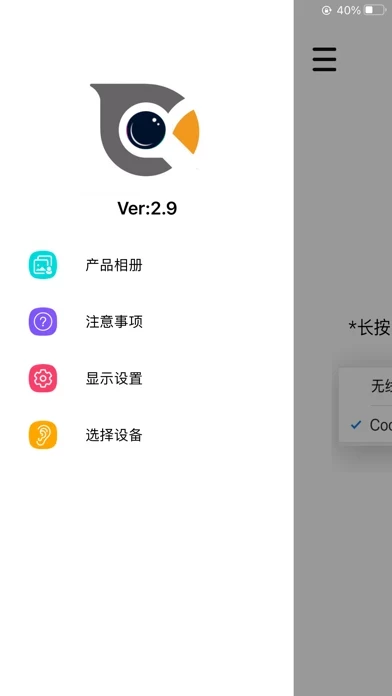
🏷️ About: The app connects with devices such as blackhead, ear scoop and dental vision through wireless wifi, and can display real-time images of macro lenses on mobile devices. When previewing the real-time picture, you can take photos and save videos.



Overall Customer Experience 😎


🤬 Negative experience
68.8%

😎 Positive experience
31.2%

🫥 Neutral
0.0%

~ from Justuseapp.com NLP analysis of 121 combined software reviews.

Is Cooleer Safe?
Cooleer appears generally safe, but use with caution.
31.2/100

  Safety Analysis »»

Is Cooleer Legit?
Cooleer appears legitimate, though exercise caution.
31.2/100


Read 35 Customer Service Reviews 😠💢

1.8 out of 5
Initializing the device

This seems to be where everything comes to a halt. I’ve been trying continuously to initialize the device, and it won’t work, it almost seems like a waste of a purchase. Based on the reviews, there are some people that are given this a 5, love to know how they got around to initialize the device. They make it seem so straightforward in their directions but yet it won’t work, and I’m no stranger to apps and tech. Cooleer support doesn’t support anything because it tells you the same thing that you’re saying in the paper instructions….HELP!!!

This app has tried to login to my Apple ID from China

I have had 3 attempts from Shenzhen China trying to login to my apple ID, coincidentally Cooleer is based there and the attempts started the day I downloaded Cooleer. BEWARE

IT WILL NOT CONNECT!!!

The device will not connect, waste of purchase, will sue company.

Can’t connect camera

For some odd reason and can’t get it Bluetooth camera to connect so I can use it. I’ve connected and paired devices I already have but this product doesn’t seem to get picked up. A waist of my money and time, especially since it took so long to be delivered. I was excited to use this but it seems to be a scam unfortunately. Sad to say I was reluctant from the start only for my suspicions real. 🤦🏾If I can’t use the camera, what’s the point?

Trash

Worked for a week and the light went out and wouldn’t turn on again

Cool instrument but…

Simply does not connect for use. Should have saved my money.

Complete trash

The thing will not connect to an phone I’ve tried it with. What an actual scam

Not worth buying

Same as first review. Tried more than I should have on tries to get item to work and it still doesn’t work. App is useless and never connects no matter what you try.

No stars, waste of money and time

When the button is pushed to connect my phone to the device’s internet (which is odd and shady) my device will connect to its network but will not stay connected.

PURE JUNK

Amazon scam with this device! Divide doesn’t work and fake remotes for product on Amazon. EVIL, EVIL, EVIL, EVIL, EVIL!!! You WILL get what you deserve in return for scamming people!

Hmmm

Garbage and a waste of money

AVOID - SCAM - INFORATION GRAB

This does not work and just wants to view network states. Do not use Cooleer. The ear cleaner is a gimmick tool to grab data.

Initializing

I have been unsuccessfully trying to initialize the device. I’m no stranger to Apps/WiFi, etc. but I am unable to connect and literally 3 minutes from just discarding this brand new product.

Annoying

Same exact post as a previous customer. Cooleer does not work. I have re-downloaded it erased try again followed all the steps and I am not new to apps, either . It’s not simple. I went online. Looked at TikTok followed where I got it from . Every instruction .still does not connect. Very annoying and what a waste of money!

Not good!!

Cooleer worked the first few times, now I can not get it to connect. What a waste of money and time!!

Pore cleaner

Cooleer is useless! Save your money and buy a cheaper version! It’s not worth 40.00 plus dollars

Do not buy!

The camera doesn’t work. When you download the wr code they ask for credit card and in small light print, signs you up for a movie and music subscription. None of the instructions work! CHINA!!!

connection not working

connection not working 🎥📲

Doesn’t work

No connection to device

Worked great before the latest update

It worked great, but since the last update, I cannot connect to my device. Please fix. Thx.

Doesn’t work

Took forever to get it to connect the the device and then I couldn’t get it to show up on the screen for the camera.

Wi-Fi requires a password and none is supplied.

The manufacturer states that no password is required to connect the Wi-Fi to the device, but the devices settings require a password to connect so camera will not work.

Waste of money!

I purchased the ear fairy ear camera took and Cooleer is useless. It keeps saying to connect device but it won’t connect! I paid extra just to get it shipped sooner and now I have to return it. I can’t even write a review on the actual product bc I can’t use it.

Never Connects

I have been able to connect once with Cooleer, it doesn’t work, it doesn’t connect. I turn it on and connect device, it says initializing connection and then tells me to please connect device and continues to do this over and over. I’m done with this, would never recommend.

Wi-Fi password

The Wi-Fi password was on the paper instruction with smaller fond. It is 12345678. I saw one user complained the wrong password of 1234567 which missed a 8 at the end. Once I found this correct password, the device connected via Wi-Fi. Good luck!

Can connect to device wifi but the app won’t work

Wifi shows up as YanXi-2113-90EE instead of this app-xxxx. Password 12345678 works. When I press the button in Cooleer whole connected, it won’t connect and show the video.

Works amazing, but starts to hurt a bit

So this is a really nice product, but if you push to hard on the sides of the ear (which is really easy to do) it starts to hurt a lot. Its most likely user error but other than that it works amazingly! I like the product a lot but I’m confused by what the extra things are for. If someone could please explain what they are for it would be greatly appreciated!

I got it to work

My experience:

Important, the iPhone will prompt for Cooleer to have access to devices on the network. You must allow this, as the device and app must communicate in order to see an image on your phone.

No password is needed. Just join the network created by the device.

I found connecting to be easier if I’m in airplane mode for some reason. The created network obviously doesn’t have internet, and I think the setting for backing up Wi-Fi with cellular data may be causing a hiccup.

Be warned, you might not actually want to see what is in your ears. As for allowing an app documented in a language you may not be able to read, is your call. Not sure about blindly trusting the fruit company or the people’s republic.

Connect with no issue here’s how I did it

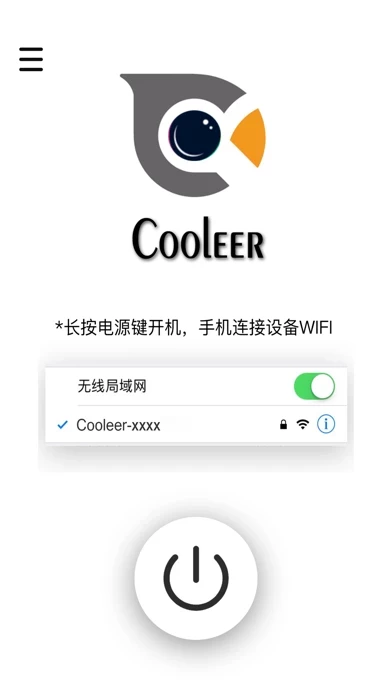
1 Turn on the camera 2 open Cooleer 3 minimize Cooleer and open your WiFi settings 4 connect to the WiFi named after your device 5 go back to Cooleer 6 Click to initialize your device 7 use your device Simple and works great takes some practice to get the hang of using it but I like it so far And like I showed above connecting is simple with no password required just like they said

Works great, a little confusing to set up

At first, I was like most people here who were having trouble connecting it to Cooleer , but after watching a TikTok tutorial, I found out you have to look for “this app” under WiFi/networks on your device, not Bluetooth like I assumed. After I did that, it connected just fine!

Figured it out in under a minute

A lot of the one star reviews are saying they can't figure out how to connect the device but it is very simple 🤦 you have to allow permission and then connect to it's personal wi-fi. it gives instructions right when you open Cooleer !

It works just fine!

It took me two times to enter the Wi-Fi password. I was not sure if I did it correctly the first time. Then took my time and the device and camera worked perfectly. If you are having trouble retrace your steps and enter it again. You will love it when you get it working. And NO I did not get paid for this review.

password is 12345678

password is 12345678

Great!

Worked flawlessly for me, and I found a cavity with it.

Works great

For the people have problems connecting… u have to connect the scope as a wifi connection in settings then press the power button within Cooleer . Hopefully this will help.


Is Cooleer Safe? 🙏

Cooleer appears generally safe, but use with caution. JustUseApp Safety Score for Cooleer is 31.2/100.
This assessment is based on our NLP analysis of 121 user reviews. Combined with the app store average rating of 1.8/5.

Safety Analysis

80% of users say app is risky 🚨
80%

12.9% of users say app is safe 👍
12.9%

7.1% of users have some concerns ⚠️
7.1%


Is Cooleer Legit? 💯

Cooleer appears legitimate, though exercise caution. Our NLP models processed user feedback to estimate legitimacy. JustUseApp Legitimacy Score for Cooleer is 31.2/100 .
This conclusion is based on analysis of 121 user reviews.

🔏 Privacy & Data Safety

Cooleer collected the following data from you:

  • Data Not Collected:


How was your experience with Cooleer? Post a Review


Features

The app connects with devices such as blackhead, ear scoop and dental vision through wireless wifi, and can display real-time images of macro lenses on mobile devices.

When previewing the real-time picture, you can take photos and save videos.

When the current photo and video, you can flip the image of the picture.

  Contact Support
Developer:
深圳市易路视科技有限公司

Contact e-Mail: