JW Conf Listener Reviews
Published by JW Congregation Support, Inc. on 2025-10-31🏷️ About: Client application for KHCONF Listeners. Uses data connection on device to listen to meeting.

🏷️ About: Client application for KHCONF Listeners. Uses data connection on device to listen to meeting.

We Investigate the app owner's website (Khconf.com), verify their legitimacy, and uncover hidden scams and complaints.
- Quick and easy to set up
- Better quality than an actual phone connection
- Works well with Bluetooth
The new app for KH Conf fails to work with iOS 11.1 to 11.3 when using Dock Connectors on speaker systems and car integration. The issue is that JWConfListener doesn’t correctly grab exclusivity over the line out function, and allows the Apple Music application to activate and play music playlists. This functionality worked correctly in previous application versions. On iOS 11.1, 11.2, or 11.3 when you connect either an active KH Conf call, or start a call, when connected to a Dock Connector enabled device (Speaker, Car Headset/Radio); the KH Conf call appears to stay connected but the audio switches to play from the Music Library.
My Congregastion used to use LiveKH which had video & also recorded the last meeting so if I missed a meeting I could watch it up to a week latter. JWConfListener is rubbish. Sounds like a phone call, no video, no recordings. In fact it’s totally pointless on my iPhone as I can just call the tie line number & use the pin without JWConfListener . Totally pointless & I'm disappointed.
When I open the JWL app to follow along with the lesson, the telephone will disconnect me from the meeting on iOS 11.4.1. Can anything be done to correct this problem? Other than this glitch, its a great app.
I love JWConfListener. My only issue is that on your iPad you can't go to JW Library to follow along during meeting because once you hit the home button it boots you off the conference.
Please disallow JWConfListener to connect if the Name field was never filled in. It's nice to know who is connecting, but do not wish to Block because of missing app information.
Thanks, cong. administrator.
Works great. Easy to set up and use. Wish I had known about it sooner!
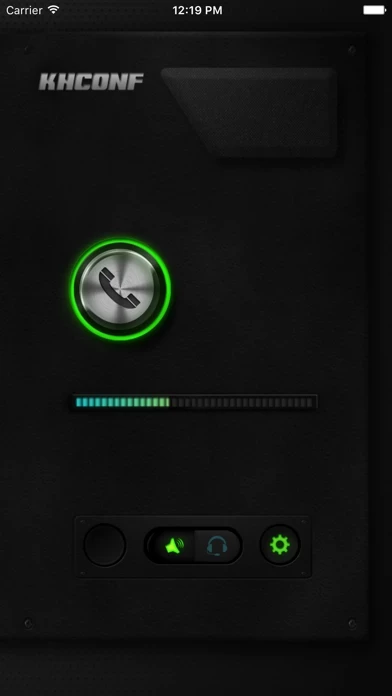
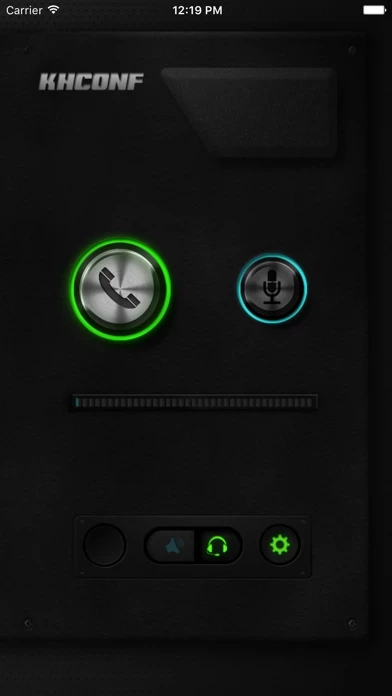
Been using this great app but I do not understand the square with up arrow (to share?) the volume icon and the headphone icon. In order for us to listen on a bluetooth speaker, we have to tap the volume button but I want to make sure our sounds will not transmit to kh speaker system. When I click on headphone, we lose the bluetooth speaker sound. Please help us to understand the icons. Many many thanks.
Use it always so not to miss a meeting.
I have no problem whatsoever with JWConfListener. Works perfectly so far. I don’t have to put PIN number every times I use it.
So suitable for every level of user, makes connection a one-click. For our entire group I say a huge thank you
At first I was frustrated trying to figure out how to use this but to anyone who also has a little trouble at first, don’t give up and don’t be afraid to push lots of buttons. There are only 4 on my iPhone.
The first 3 are sound related
1. The cast button (looks like a TV) - makes your sound come from alternate devices. Does not work well with Bluetooth in my experience.
2. Speaker/headphone gives the option to listen on speaker or on headphone or holding cell phone to your ear.
3. The settings button. This is where you make sure your telephone numbers and pin are correct and you add the number of listeners. KHconf formatted the numbers for me. All my settings are off, btw.
4. The “call” button. This was frustrating for me but I figured it out.. ready? You have to push the button twice. Push it once, it turns yellow. If you don’t push it again within about 2 seconds it goes dark. But if you push it the second time while it’s still yellow it goes green and voila!! You’re connected!!
Thanks brothers keep up the good work
The KHCONF App works perfectly! I would like to see a tutorial on the KHCONF website to be sure I am utilizing all the available features, but for now it works great!
Thank you so much! The Christian Park Congregation in Indianapolis expresses gratitide as well.
Such a blessing from Jehovah. I’m a caretaker/wife of a disabled person and we depend on the tie-in for every meeting. We really appreciate our brothers who give us the spiritual food even when we can’t get to the Kingdom Hall. Thank you!!!
It is working sooo great... easy set up, no problem going along with the meeting, but I want to know if I listen in, will they hear me coughing or sneezing just in case it happens since JWConfListener doesn't have a mute button like the phone does?
Have had JWConfListener for several years. Easy to use, especially for the older ones in our KH. Allows simple connection for listening to meetings when unable to attend due to illness or other circumstances.
Used it for the first time this morning for the meeting and it worked flawlessly. I did notice it uses speex and was wondering if perhaps you had thoughts of upgrading and using opus since it's the newer standard and it's also free and open source?
With most everyone having WiFi now, JWConfListener has been very helpful to the friends in our congregation. We have a lot of elderly and sick as well as caregivers that utilize JWConfListener . Thank you. I’ve had it for a couple years now, but am only now rating. Thank you KHCONF.
Awesome app makes calling into the meetings easier, Just think it needs a mute button. Our hall phone line doesn’t mute out the other listeners we actually have to push mute. If it’s an automatic mute let’s us know. Thanks Brother! 😊👍
Also another user complained that it allows you to block the caller id. Personally I like it that way. In my opinion keep it that way. 👍
This works very well. No real learning curve, you can quickly be set up and ready to "dial in" to the meeting. It even has better quality than an actual phone connection to the same conference. Don't hesitate - you will love it. If only it had a record option built in like the Windows .exe program has?... well, it would likely get 6 gold stars!
I have been disabled for several years and have to listen to the meetings at home. This is a wonderful technology for being able to enjoy the spiritual food provided by Jehovah. Thank you so much.
JW Conf Listener appears generally safe, but use with caution.
JustUseApp Safety Score for JW Conf Listener is 33.3/100.
This assessment is based on our NLP analysis of 221 user reviews.
Combined with the app store average rating of 4.5/5.
JW Conf Listener appears legitimate, though exercise caution.
Our NLP models processed user feedback to estimate legitimacy. JustUseApp Legitimacy Score for JW Conf Listener is 33.3/100 .
This conclusion is based on analysis of 221 user reviews.
Uses data connection on device to listen to meeting.
Client application for KHCONF Listeners.