Blur Video Reviews
Published by Alan Cushway on 2026-01-23🏷️ About: Improve privacy by blurring faces, logos or objects in the background of your video. Apply blur effects on videos for YouTube video, Tiktok + other social media platforms.

🏷️ About: Improve privacy by blurring faces, logos or objects in the background of your video. Apply blur effects on videos for YouTube video, Tiktok + other social media platforms.


We Investigate the app owner's website (Photovidapps.com), verify their legitimacy, and uncover hidden scams and complaints.
- The app has a great tracking system for blurring moving objects and people in videos.
- It is simple to use and free.
- It can effectively blur faces and URLs in videos to maintain privacy.
- It helped the user achieve the desired outcome for their video.
I love BlurVideo , simple to use, but would be nice to have a slow-motion playback option so you could control the blur by second a lot easier. Otherwise, no complaints and only good things to say about it.
Nice app to block out unwanted faces. Took me a small minute to realize you had to drag the blur throughout the video to keep the face out of it. Not sure which app follows head movements but BlurVideo is nice.
It gets the job done but needs improvement and face tracking.
Honestly not much else to say. I was looking for an app that can blur my face on certain videos, all to maintain privacy. Wow! I’m really impressed with what a free app can do!
I think what I’m most impressed about is BlurVideo ’s tracking system on its blur. Once you move the cursor/blur symbol around to where you want it, it does a great job on keeping up with moving objects/ and people in the video.
Would definitely recommend!
BlurVideo is super easy to use. I have tried other apps and they were very confusing. This one makes it simple and fast. Definitely worth a try.
I’ve been using BlurVideo to process long, HD videos with many different moving blurs added. It keeps up with ease! Interface is simple and easy to understand, processing power is unmatched with other censorship apps. I will be making any purchases possible to support BlurVideo! Just excellent!
I have only made a few but so far this is 10/10! I was able to move and make the blur-circle bigger along with the video and it’s so simple and easy. This is very well made for a free app and I have no regrets downloading it. I would definitely recommend! Minimum adds and honestly, it’s probably the best free blur app i’ve downloaded! 😍😍
I shoot art nude photography and occasional video content especially behind the scenes timelapse. I needed a simple and easy way to blur nudity for social media and BlurVideo was simple, free, easy to use and accomplished what I needed. Highly recommend for quick blurring of video clips.
I’ve tried a couple of other blur effect for videos apps, and this one hands down is the best!!! A lot easier to use, and when I sent an email to Alan (developer), he responded so quickly. I highly recommend BlurVideo!!! 🤩
BlurVideo has been working exactly how I needed it to. To blur out my address in a video. Took some time to get used it it but I’m glad I stuck with it because it hasn’t costed a monthly fee like most apps
First blur app i found and I’m sticking to it . Does what its supposed to do with ease . It’s a Simple app , easy to use , and it makes my video editing skills look sharp and professional .
I love the way I can adjust the blur ! I have a student that can be in the video and it makes it easy for me to blur her out ! She always seems to be in the view of videos .
I was trying to make a video and I didn’t want someone’s face coming out in it so I download BlurVideo and a bunch of others but the others weren’t working and they just did it come out the way that I wanted the video to come out, once I tried this one the video was perfect and I got the video how I wanted it and how I wanted it to look. so I really think BlurVideo is amazing and really convenient I love it <3!
Hands down, best app made for blurring at no additional cost. Let’s you set how blurry you want a spot to be, different variety of size, blur or pixlize.
Great for videos, love BlurVideo .
Definitely 5 stars
So happy I downloaded this. It was super simple to work with, while also offering just what I needed (no more, no less)! A well deserved 5 stars.
I’ve been looking for an app like this for a while and this one is free. I definitely recommend. It does everything that I need it to do!
BlurVideo is literally the best, I love the fact that the blur can follow the movements of the face or item chosen to blur out even as the item or face moves through the video
Not even close. Blows out the other apps on here. Actually well made and easy to use.
I post videos of development websites for non-owners to look at, but I want the URLs to be blurred. Unfortunately when taking mobile videos Apple has decided to move the domain area up and down as you scroll up and down. You can create key frames and maximize the viewable parts and still block the constantly moving URL. Just an amazing app!!!
I have been looking for something like this everywhere for windows, mac. Little that I know my phone could do it better, easier and faster.. Thanks!
Quick, intuitive, no upselling, no watermark, no noticeable loss of video quality on export. One suggestion would be an “undo” button and an ability to zoom in to the timeline for more precise editing. But, I can’t complain, it’s free and wonderful!
Easily one of the best apps for blurring images and parts of video! Sorry that I wasted so much time on other apps trying to get this thing done. The Blur app makes this difficult job of adding blur extremely easy. Highly recommended!!!
It’s my first time using BlurVideo , and I just finished making my first video! With a foster care kid in our home BlurVideo makes it so easy to share cute family videos while keeping the kids face covered (state law.) thank you!!
BlurVideo has so far been Uber reliable and that’s hard to find. As long as they keep it fast with no bugs, with privacy and encryption in mind and free I will sing its praises and use it until Lord Zedd comes back!
BlurVideo is really user friendly and I was able to make it work for me within a couple minutes. Great app for blurring faces/text in videos
It works and is easy to understand. It has ads (It’s free and they need to be paid for their work). I was working with another app and it was painful. This is simple and works.
Easy to use, works well.
Would like to be able to zoom in on the video while editing, but really a minor problem.
I needed something quick to help blur faces in the background of shots to those who have not given consent. Works perfectly!
Was able to blur moving faces in a video in just minutes!
Blur-Video is very safe to use.
JustUseApp Safety Score for Blur Video is 84.4/100.
This assessment is based on our NLP analysis of 13,122 user reviews.
Combined with the app store average rating of 4.8/5.
Blur-Video looks authentic and legitimate.
Our NLP models processed user feedback to estimate legitimacy. JustUseApp Legitimacy Score for Blur Video is 84.4/100 .
This conclusion is based on analysis of 13,122 user reviews.
Blur Video collected the following data from you:
**Pricing data is based on average subscription prices reported by Justuseapp.com users..
| Pricing Plans | Amount (USD) |
|---|---|
| Blur Video Pro | $9.99 |
| Blur Video Pro | $3.99 |
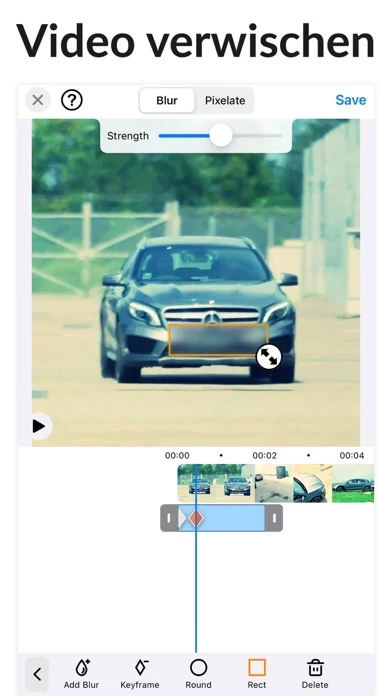
This blur video editor is the only answer for all your video editing needs regarding pixelating faces or any other unwanted objects and areas of a video.
Unlike other apps you can define more than 1 areas to blur/pixelate using elipse or rectangle shapes with offset so you can easily blur with touch using your finger.
Apply blur effects on videos for YouTube video, Tiktok + other social media platforms.
Improve privacy by blurring faces, logos or objects in the background of your video.
Define the duration of each blur area and adjust the intensity.