Engineering Blueprints (F) Reviews

Engineering Blueprints F Reviews

Published by on 2020-03-08

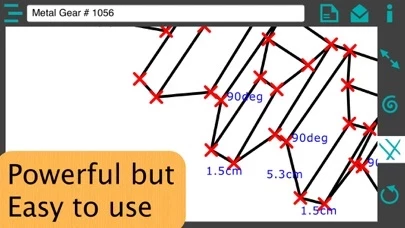
🏷️ About: App for drawing Engineering Blueprints. You can draw straight lines, curves, scroll through the drawing, add text to the drawing and move points and text in the drawing.



Is Engineering Blueprints F Safe to Use?

We Investigate the app owner's website (), verify their legitimacy, and uncover hidden scams and complaints.


Overall Customer Experience 😎


🤬 Negative experience
100.0%

😎 Positive experience
0.0%

🫥 Neutral
0.0%

~ from Justuseapp.com NLP analysis of 5 combined software reviews.

Is Engineering Blueprints F Safe?
Engineering Blueprints (F) does not appear safe based on available data.
0/100

  Safety Analysis »»

Is Engineering Blueprints F Legit?
Engineering Blueprints (F) does not appear legitimate based on our analysis.
0/100


Read 4 Customer Service Reviews 😠💢

2.0 out of 5
Garbage

Don't waste your time!

Useless

No orthogonal lines, no arcs, no dimensions, essentially a scribble pad. Wasted 0.99. Deleted.

Helpfull

Well it is helpful to some of my ideas but it could use some more features like a 3d building

iPad App that doesn't support Landscape mode?

Uninstalled after learning this "iPad" app doesn't support landscape mode on my iPad Pro. Looking for another app now.


Is Engineering Blueprints F Safe? 🙏

Engineering Blueprints (F) does not appear safe based on available data. JustUseApp Safety Score for Engineering Blueprints F is 0/100.
This assessment is based on our NLP analysis of 5 user reviews. Combined with the app store average rating of 2.0/5.


Is Engineering Blueprints F Legit? 💯

Engineering Blueprints (F) does not appear legitimate based on our analysis. Our NLP models processed user feedback to estimate legitimacy. JustUseApp Legitimacy Score for Engineering Blueprints F is 0/100 .
This conclusion is based on analysis of 5 user reviews.


How was your experience with Engineering Blueprints (F)? Post a Review


Features

We were looking for an App for drawing in the App Store easy to use and we didn't find it so we decided to create one and we think we have achieved that objective with this App.

You can draw straight lines, curves, scroll through the drawing, add text to the drawing and move points and text in the drawing.

You can send an e-mail with the drawing as an image attached to the e-mail.

You can draw many drawings and give them different names.

We focused on making an App powerful but easy to use.

  Contact Support
Developer:
G Marroquin