Codepoint Reviews
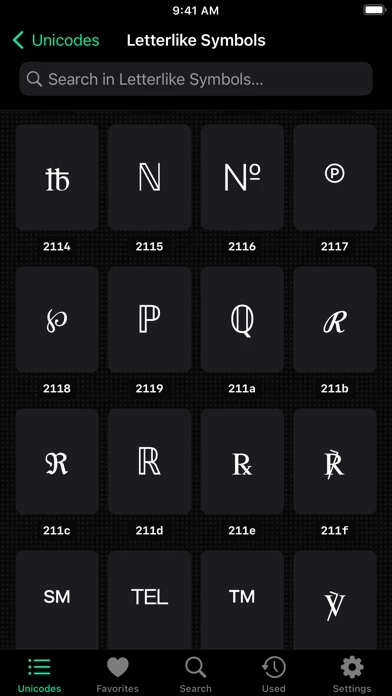
Published by App ahead GmbH on 2026-02-13🏷️ About: 70,000+ Unicodes in your pocket! Codepoint helps you find glyphs, icons and symbols. Search for Unicodes, characters, emojis or SF Symbols.

🏷️ About: 70,000+ Unicodes in your pocket! Codepoint helps you find glyphs, icons and symbols. Search for Unicodes, characters, emojis or SF Symbols.

We Investigate the app owner's website (Ixeau.com), verify their legitimacy, and uncover hidden scams and complaints.
Not very useful since lots of symbols are not available. Not I cannot even open it without collapsion.
I bought this application because I needed the SF Symbols; the problem is when you choose a symbol in 3D you get it as a "?" mark. If you want to copy any symbol in 2D or 3D you paste it and what you get? you get the "?" mark.
If this is fixed than I give a 5 stars otherwise it is useless.
noticed it crashes a lot in Sonoma when i click on one symbol to get the details vew.
Works well but copying is needlessly two steps
Codepoint is pretty nice. Does what it's supposed to do, and looks nice while doing it.
Some feedback:
- I'm Not sure what the purpose the little chirp when double clicking a character is. It's annoying, but it doesn't look like it's possible to disable it.
- I do which the search were better — for instance, searching “italic a” does not return 𝑎, unicode 1d44e (mathematical italic small a)
- I wish there were a way to copy the name of the character (“mathematical italic small a”)
App crashed when I try to open number forms in 3d
Great app to have makes Unicodes easy! Searching for Emojis could be better if an emoji sub-category field was implemented within. Would of given 5 stars if so.
Codepoint is well-designed with various features but lacks one key aspect that would elevate it to perfection - keyboard support. It would be fantastic if we could access all the symbols directly from our keyboard to insert, copy, or share them from anywhere. Hopefully, this will be a feature that will be considered and implemented in the future to make it 5 stars ;)
Codepoint is well-designed with various features but lacks one key aspect that would elevate it to perfection - keyboard support. It would be fantastic if we could access all the symbols directly from our keyboard to insert, copy, or share them from anywhere. Hopefully, this will be a feature that will be considered and implemented in the future to make it 5 stars ;)
Codepoint is well-designed with various features but lacks one key aspect that would elevate it to perfection - keyboard support. It would be fantastic if we could access all the symbols directly from our keyboard to insert, copy, or share them from anywhere. Hopefully, this will be a feature that will be considered and implemented in the future to make it 5 stars ;)
This is Codepoint that Apple would write to display and search unicode. I can't imagine how much time it took to compile all that and make it so nice, but thanks for your work.
However, it does not save favorites. Favorited some yesterday and none found today. Nevertheless, worth the purchase.
Attractive and clean UI with all the details I need.
Suggestion: let me search Unicode or SF Symbols alone. (If I'm specifically looking for a Unicode symbol, SF Symbols probably won't be of use.)
ABSOLUTELY INCREDIBLE APP. THANK YOU FOR MAKING THIS *CHEFS KISS* CREATION!!
Codepoint is very safe to use.
JustUseApp Safety Score for Codepoint is 75.2/100.
This assessment is based on our NLP analysis of 40 user reviews.
Combined with the app store average rating of 4.9/5.
Codepoint looks authentic and legitimate.
Our NLP models processed user feedback to estimate legitimacy. JustUseApp Legitimacy Score for Codepoint is 109.8/100 .
This conclusion is based on analysis of 40 user reviews.
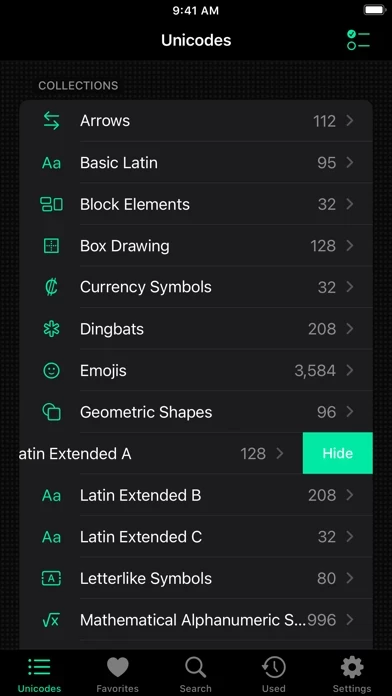
70,000+ Unicodes in your pocket! Codepoint helps you find glyphs, icons and symbols.
Search for Unicodes, characters, emojis or SF Symbols.
Export them to different formats like Hex, Decimal, UTF, HTML or Swift code.
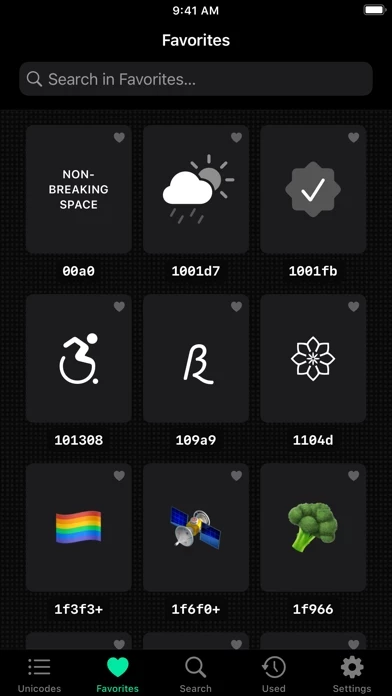
Mark your favorites and access them on all your devices thanks to iCloud sync.
Hand-picked glyphs are also accompanied by typographic hints that explain how to use them correctly.