Altimeter - Altitude & Compass Reviews

Altimeter Reviews

Published by on 2026-05-18

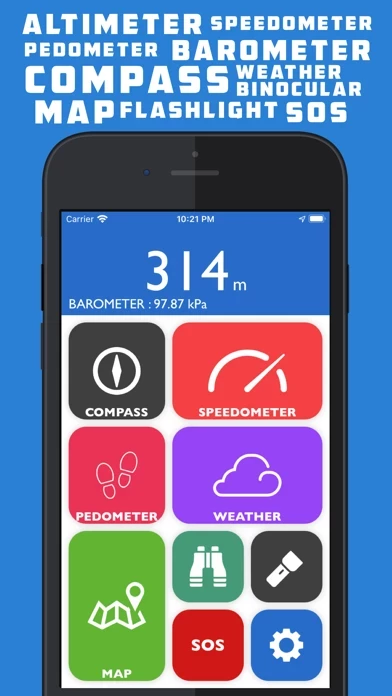
🏷️ About: Altimeter GPS is a multipurpose app designed for hikers, trekkers, and globetrotters. It offers a range of features such as an altimeter, barometer, compass, weather updates, pedometer, speedometer, maps, binoculars, flashlight, SOS, and more. The app is suitable for both urban and backwood areas and is ideal for outdoor activity enthusiasts.


Is Altimeter Safe to Use?

We Investigate the app owner's website (), verify their legitimacy, and uncover hidden scams and complaints.


Overall Customer Experience 😎


😎 Positive experience
66.6%

🤬 Negative experience
33.4%

🫥 Neutral
0.0%

~ from Justuseapp.com NLP analysis of 8,454 combined software reviews.

Is Altimeter Safe?
Altimeter - Altitude & Compass is very safe to use.
66.6/100

  Safety Analysis »»

Is Altimeter Legit?
Altimeter - Altitude & Compass looks authentic and legitimate.
66.6/100


Summary of Customer Reviews (Takeaways): 💎

- Offers many functions in an easy-to-use app with a simple and clean layout

- Seamlessly interfaces with Fitbit

- Provides a safety button that gives the user's lat/long

- Free version offers a lot and is clean and easy to understand

- Non-hassle option to go pro


Read 21 Customer Service Reviews 😠💢

4.6 out of 5
Another Shady Developer

Of course another shady deceptive developer that Altimeter Store and AppAdvice should ban. Touts the IAP is free today, but disables it so you cannot upgrade. Instead the Upgrade path takes you to “Check It Out”, which does nothing. The developer shows how good his skills are though...ALL of his apps currently are exhibiting the same response to trying to select “Upgrade”...they all just show “Check It Out” with no way to upgrade any of them to pro. If they would put as much effort into producing and enhancing their apps as they do in trying to scam the users they would make much more money and have much more positive status. Unfortunately, there are those who take much more pride in being dishonest.

Issues Already...?

I just downloaded Altimeter because all of the functions are perfect for what I do most days and would be extremely useful for me. Today only you're supposed to be able to upgrade to the Pro version for free. I've confirmed the update within Altimeter several times, attempted to restore the purchase, even closed Altimeter and restarted it and I'm still unable to access the pro features. I would really appreciate help with this issue because I'd love to use Altimeter with it's full functionality.

So much potential

The idea is there but Altimeter is very Buggy! It crashes every few minutes. It stated pro version was free so I could not wait to see the features! Well... I am still waiting. Even when I put my account in it rolls back to asking me to purchase pro then it states I already have pro. So the question is do they have a pro version or not. Even after “purchasing” pro it will not allow me to activate pro so lots of ads, the measurements do not all change and the pro features are gone. Keep working on the ideas Altimeter just is not ready to roll out!

Cannot upgrade to pro

I have owned the free version of Altimeter for quite some time. Today all features of Altimeter are supposed to be free but my app will not update. I deleted it and re-downloaded it. I checked my purchased apps to see if I had to update it. I turned my phone off and back on. No luck getting the added features. The offer is today only so I hope someone can help.

Photo using binoculars option?

Like others it did take several tries to get all of the “free” pro updates to finally install and stay. My question is how to take a picture using the binoculars? I have the camera option enabled. The camera icon does turn the camera to front facing. but see no obvious way to capture a shot
Anybody else have this problem and have a solution?
Please help

Still needs work

I like Altimeter and its simplicity, the problem that i have with it right now is when I purchase in app options, they go back to “upgrading” for in app features, it doesn’t keep them purchased, so you have to go click on already purchased one every time you use Altimeter to make the options work, and besides that even by going for clicking and purchasing again every time, Altimeter starts to crash, so you have to do it all over again, and then Altimeter crashes again, it is a vicious circle.

Nice, but there are issues

Looks nice, but there are inconsistencies in the interface that make it annoying. For instance, in the weather module, I selected imperial units but the wind speed is shown in meters per second. Then there are settings buttons inconsistantly scattered about in some of the modules instead of having all settings together. It's a nice app with a lot of potential, but in its current state appears cobbled together by someone who needs to back off of the weed a bit.

Almost perfect for me...

I would love to give this awesome app 5 stars, but it needs one more feature for me. Actually 2. As a physical therapist, I have to measure number of feet patients walk. Could there also be a unit option for feet on the pedometer? I have seen another app where there is a button to track your distance walked similar to a stop clock. Start button, patient walks, stop. It would be a PTs dream to not have redo the walk route with a distance roller or counting ceiling tiles. I would recommend to tons of fellow PTs if this were an option! Thanks, great app.

The last person must be high? This is the greatest weather/ Indiana Jones impersonator

I have compared Altimeter to others like it and “this app” outshines.😉 By far outshines all similar apps. To be completely honest it did take getting through some frustration downloading the free upgrades (having to purchase each one separately and crashing each time you do so )but with its simplicity in style and functionality that magically looks and feels like anything but, you will bathe in all the satisfaction that is “this app “ when all is said and done.

Question

I downloaded Altimeter to the iPad and the iPhone. When I click on both apps at the same time, the altitude is not the same. I was not aware that altitude at a given location can change. Other than that, Altimeter looks nice.

Need option to adjust the lenght of step

Very, very nice app! But i think the developer should think about an option of step lenght; i am height of 2.01m, walking beside my son (1.53) same distance, about 3km. He had 5011 steps, but i did 3654, which showed i did 2.2km. Maybe it will be a good option to give an opportunity to adjust step lenght, manually in settings?

Can you fix the pedometer notification?

The pedometer notification is still sending me notification from the very first day I used it as “yesterday’s steps”. It also only updates the number of steps on Altimeter screen as the last time I opened it which defeats the purpose of of having the number on the screen.

Thanks.

Great app!

The developer is brilliant! I was lucky enough to read about Altimeter and downloaded it for free during a promotion. I fell in love with it in the first five minutes! So many functions in an easy to use app, with a simple and clean layout. And it really does interface with Fitbit, seamlessly. I am thrilled to finally have an app that will give me all the functions I need and want when hiking, including a safety button that will give my lat/long. I’ll say this - the pro features are worth the minor cost - it was not a disappointment like so many other apps can be when you ‘upgrade’ - go for it!

Question?

If the PRO version is free for today only but when you go to download the Pro versions each one of them still shows a price, if I click to download them will I still be charged for each of those updates or will it bypass the price and automatically download each Pro version for free?

Excellent app (a little room for improvement)

Altimeter is well designed with a clean interface and quick reference to uncluttered info (the weather section is my early favorite). However they still need to make upgrading to Olathe Pro version simpler (i.e. all in one logical place).
I jumped at the chance to try Altimeter out on a day the extras were free but it took multiple tries to unlock each pro feature. It was only when I "restored purchases" that everything fell into place.

Home screen isn’t working

I want to give 5 stars but why can’t I see the bottom of the home screen? (iPhone xs max; iOS updated & current: 13.5.1)
There’s no way to pull it up; where are the settings. I’ve had Altimeter for a while and it has always ran smooth. But today it’s FREE thru AppAdvice. Can’t I upgrade to the current offer as a continued user? Or is it for new only? :// Please fix the home screen prob at least. Thanks!

Free today

Just want to say that I was able to upgrade to Pro with no problem. Changed all the units to Imperial, GPS is accurate, weather is comprehensive, pedometer data is on. I have to wonder if some of the problems reported here are due to user error not Altimeter or dev. Instructions do say to unlock each Pro utility. You might need to clear RAM or reboot your device to see the upgrade. Overall it seems like a well thought out app that I look forward to playing around with more!

App review

Awesome app- we have some work to do to perfect the consistency of user friendly operations.
I have read the reviews and they have covered it all so I will not repeat them. Altimeter shows great intentions and that said I give you a five star in order for you receive credit when credit is due. I am confident that you who built Altimeter will not stop until the bugs are gone. My personal request would be to be able to take pictures with the binoculars. Thanks from Bailey’s Den

So far GREAT!

App offers a lot in free version. Very clean and easy to understand. Free version comes with commercials and non-hassle option to go pro. Like I said, free is good on its own. My only dislike is that there is no Buy All Upgrades at cheaper rate. Each section is treated somewhat separate with own options to upgrade for .99 cent. Could be wrong. Did quick overview. In short: clean, easy on eyes, easy to navigate, good apps & seems stable. Just needs option to purchase all upgrades at once with bulk price.

Excellent looks, great performance!

Having spent some more time with Altimeter, I’ve decided to update my review. Altimeter looks superb. Very clean and polished. You can tell a lot of work went into it. But what good is an app if it’s just pretty? Well, Altimeter performs too. I’m loving all the different functions this thing provides. Very, very well done. I’ve found my new partner for my little exploration jaunts. A lot of good functionality with Altimeter. I would certainly recommend!

Almost perfect

I like that I can set the readout to imperial, all except the barometer. It still reads in kilo-parsecs or something, instead of inches of mercury. I realize that this is a US only standard, and that I am seriously limiting myself, but as Trump is my witness (until 2020), we all still like to live in the backwoods heah. If you do this one last thing before impeachment day I’ll raise tour stars to 5.


Is Altimeter Safe? 🙏

Altimeter - Altitude & Compass is very safe to use. JustUseApp Safety Score for Altimeter is 66.6/100.
This assessment is based on our NLP analysis of 8,454 user reviews. Combined with the app store average rating of 4.6/5.

Safety Analysis

78.9% of users say app is safe 👍
78.9%

16.8% of users have some concerns ⚠️
16.8%

4.2% of users say app is risky 🚨
4.2%


Is Altimeter Legit? 💯

Altimeter - Altitude & Compass looks authentic and legitimate. Our NLP models processed user feedback to estimate legitimacy. JustUseApp Legitimacy Score for Altimeter is 66.6/100 .
This conclusion is based on analysis of 8,454 user reviews.

🔏 Privacy & Data Safety

Altimeter collected the following data from you:

  • Data Used to Track You:
    • Identifiers
    • Usage Data
    • Diagnostics
  • Data Linked to You:
    • Identifiers
    • Usage Data
    • Diagnostics
  • Data Not Linked to You:
    • Diagnostics

Payments 💸

**Pricing data is based on average subscription prices reported by Justuseapp.com users..

Pricing Plans Amount (USD)
Altimeter Map Pro $2.99
Altimeter Binoculars Pro $1.99
Altimeter Weather Pro $1.99
Altimeter Pedometer Pro $2.99
Altimeter Pro $4.99


How was your experience with Altimeter - Altitude & Compass? Post a Review


Features

- Altimeter and Barometer: Get real-time elevation/altitude and atmospheric pressure updates.

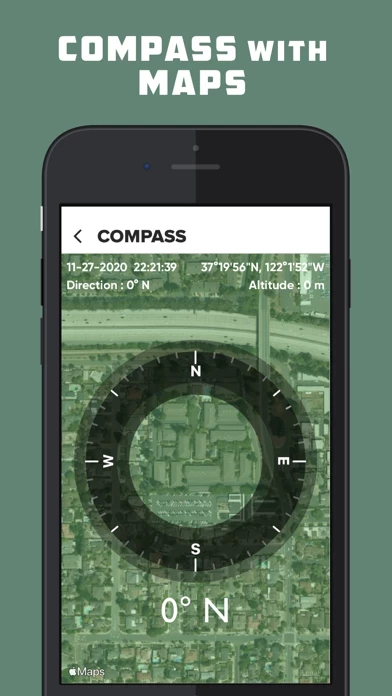
- Compass: Always pointing in the real-time direction based on your satellite position.

- Speedometer: Provides real-time speed readings along with location address and direction.

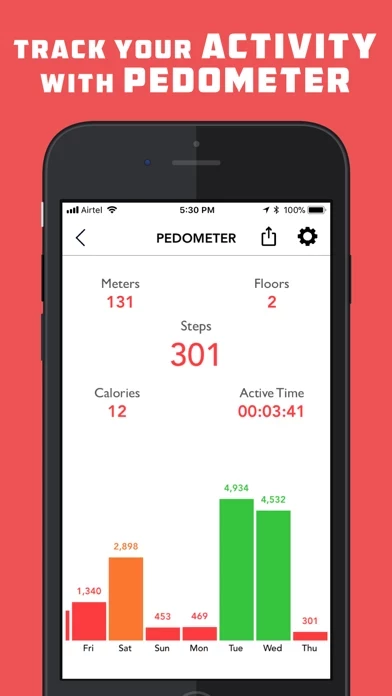
- Pedometer/Step Counter: Tracks the number of steps taken, distance traveled, and floors traversed.

- Weather: Provides real-time weather updates based on your location, including temperature, humidity, sunrise/sunset time, min/max temperature, and wind speed.

- Weather Forecast: Provides a two-week weather forecast.

- Binocular: Offers high-quality zoom up to maximum zoom level.

- Flashlight: Bright, optimized, and reliable flashlight.

- SOS: Sends real-time coordinates to your dear ones in case of an emergency.

- Map: Tracks your position in maps with standard/hybrid/satellite maps.

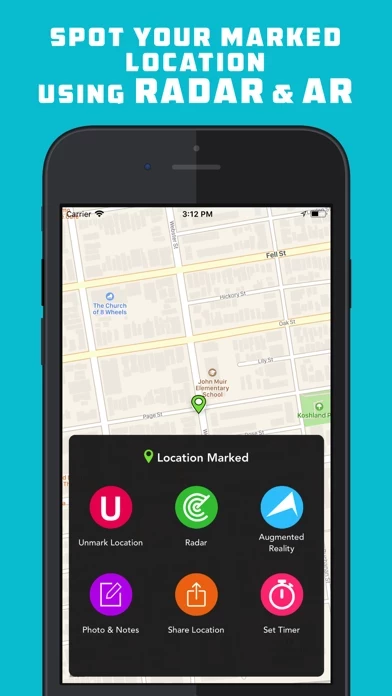
- Mark Location: Saves a location and tracks back to it using radar, augmented reality, and map directions.

- Radar: Locates your marked location using radar.

- Augmented Reality: Provides a real-time directional arrow pointing towards the direction of your marked location.

- Photo and Notes: Takes a picture along with written notes of your marked location and saves it.

- Marked Location Timer: Sets a timer alert and sends a push notification after the timeout.

- Shake to Save: Manually marks your location by shaking up your iPhone/iPod.

- Get Coordinates: Copies your current and marked coordinates using the "Get Coordinates" section in "Map Settings."

- Voice Instructions: Provides voice instructions when you mark/unmark your location.

  Contact Support
Developer:
Gaurav Babbar

Contact e-Mail:

Website: