C Time Reviews
Published by Siegware on 2020-02-26🏷️ About: Your time is precious. C-Time is the App that helps you see, how much of your valuable time you spend at certain places.

🏷️ About: Your time is precious. C-Time is the App that helps you see, how much of your valuable time you spend at certain places.

We Investigate the app owner's website (Facebook.com), verify their legitimacy, and uncover hidden scams and complaints.
Outdated and doesn’t support the new iOS display ratio.
Search doesn’t work in the map view.
Cannot send feed back.
I have the same issue as the review done by “Left Angle”.
I use this to keep track of my time at all our different jobs. Some jobs last for a few days, weeks for a month. My biggest complaint is that there is no way to link to Apple maps or Google (it would be nice to have a choice between the two) so that you can type in a physical address to find it. I’m in NM and some of our locations are to time consuming, if not impossible to find via the crosshair drag drop. Developers, if you could fix this I can start adding stars to my review. User friendliness is the key here.
I’ve been using CTime for years. Updated to iOS 15 and now it doesn’t automatically clock me in or out correctly. Sometimes it works right, other times it doesn’t. Please fix. I love CTime.
CTime does everything you would want in a C-Time tile app. However, the design of CTime and App Store screenshots don’t lead you to think it’s going to be more than a one trick pony at best.
Would like to see more granular control on the geofencing feature, ideally allowing me to create a fully custom radius size as my fence. Allowing me to draw non circular shapes yodeling mg geofence to create C-Time reports as granular as from room to room and supporting elevation for floor to floor changes would be great.
Ideally, CTime would constantly monitor my gps coordinates. The first week of using CTime would just be a training mode to get used to my patterns. Opening up CTime after a few weeks of this training should show me a list of all the places I frequent and allow me to fine tune them need be. But it certainly round be great if checking in and out happened automatically in addition to automatic customer scaled geofences.
Great app even as it stands. Just not presented very well.
CTime is amazing I love it, but why doesn’t it tell me how much time I’m out? Like while I’m not in any of the locations I have in “places”
CTime was performing great as usual (i’m using it for a long time now), but since the 12th of decembre, CTime is not working as expected. I have two locations in c-time, and the timer is acting like if CTime switch continuously between the two places. A colleague at work is facing the same problem, and also from the 12th of this month, can you see what happens (i can’t give bad rating, 4 stars, causr i know bugs happened, thank in advance you for your efforts.
I really like CTime. It just quietly works in the background. What I would like better is if CTime was more strongly supported. Update CTime more frequently. Implement some of the suggestions from previous reviews. Show that the developer is still supporting CTime and I would feel a lot better about relying on it.
Very nice app, it does work the way it’s described. Great for keeping an eye on the clock when you doing work.
New feature suggestion: exclude specific time for specific locations: for example don’t log if it is night and i am at home. This is useful if i want to know how much time i spent at home when i don’t sleep
It’s great that I get checked in but not when I’m across the street at Taco Bell. Maybe shortening the distance will work better for me. Not as I’m parking in parking lot.
C-Time is one of those high quality apps that is a must have. It is simple and supremely functional. The extremely accurate information it is able to provide is invaluable to any number of many end use applications. It is also quite amusing to discover exactly where one has been, for how long, and how many times one has been there over long periods of time.
The developers are strictly professional and absolutely committed to maintaining the highest standards of excellence with regard to both the application and their patrons. Well done all around.
At my job I travel to multiple locations every day. I have to keep track of my time. When I kept track of my time manually it was a pain to say the least and sometimes I forgot and had to estimate it. When I saw CTime I had to try it. It works great! Now I don't have to ever worry about forgetting to track my time. I hope in future updates the can add a mileage tracker too.
It's useful to manage my time and sort by place. It works automately so you set it up once.
The best app for me
It's so good
I’ve gotten forgetful as I get “older” and forget to write my time down so I can get paid. CTime is great for me! Thank you!
CTime has saved me a lot of hassle with where I’ve gone, when, & how long.
Great for filling in the blanks on my time reports & schedules!
I use this as a backup to remember how long I was at a location. It’s a big help in reconstructing my calendar and time card. I also use it to track volunteer time at a number of non-profits.
CTime has become a God send for me! I volunteer ea week@ the school & no doubt I cheat myself of log-able hrs so I wasn’t getting credit For All my actual volunteer hrs. W/C-Time I no longer miss hrs I’ve worked because it logs me in as I pull into the school parking lot & logs me out as I leave!!!! No more lost hrs!
I have used this app for several years now, with place markers at all pertinent business and personal locations. My work schedule takes me all over the state and this app has been crucial to my tracking and accountability. Thank you!!
such a simple concept, but allows more accurate billing for time spent on a job site. one thing to make it better would be to allow notes. that way user could make a note about what they did during that time.
Developers understand their products intimately. End users don’t interface with them as much or as often. I’ve been using C-Time for about 3 months, but when I want to add another target, I’m rarely there, so I have to access it via CTime ’s map.
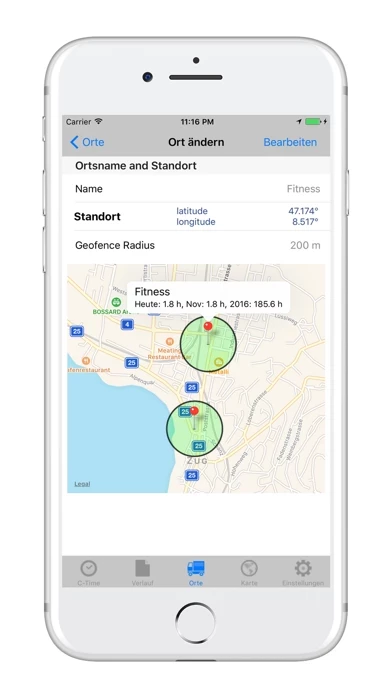
This is where all C-Time’s intuitive function disappears. It’s possible to add remote places, but the process is well hidden. 1. Open C-Time 2. Open Places 3. Open Edit 4. Open Add Place 5. Open Latitude Longitude 6. Respond “no” to are you there? 7. You’ll be taken to a map with a target over your present location. 8. Scroll to the location you want to add 9. Select “Define” (Do NOT select “Add a Place”, the intuitive option because you’ll be starting over). 10. Define the radius. 11. Give it a Name 12. Select “Save”.
So, with the exception of not being able to add places in under a 1/2 hour of trying to get the steps right, this is a very useful app.
C-Time is very safe to use.
JustUseApp Safety Score for C Time is 95.8/100.
This assessment is based on our NLP analysis of 39 user reviews.
Combined with the app store average rating of 4.4/5.
C-Time looks authentic and legitimate.
Our NLP models processed user feedback to estimate legitimacy. JustUseApp Legitimacy Score for C Time is 96/100 .
This conclusion is based on analysis of 39 user reviews.
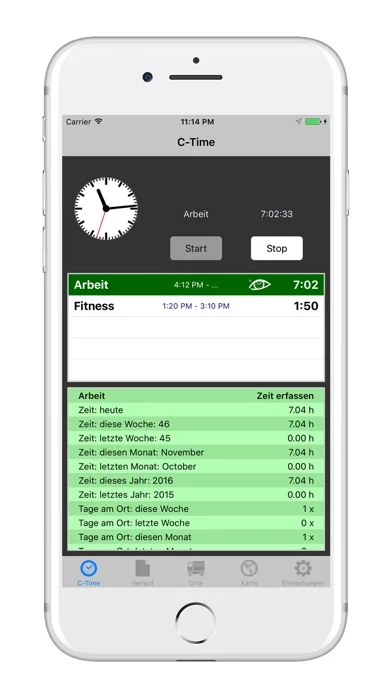
Whenever you drive / walk into your defined places, C-Time will register your entering and start counting the time you spend at this place.
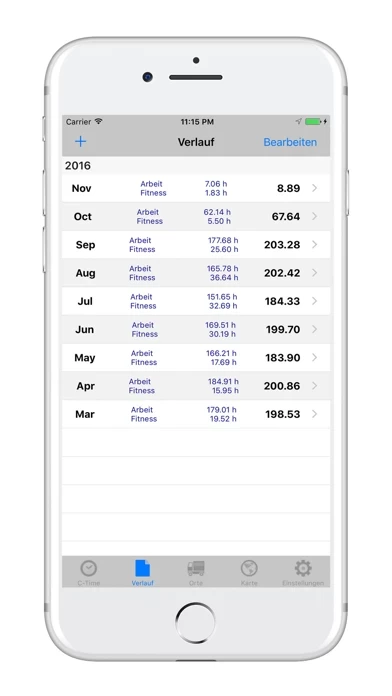
C-Time works with geofence system and will automatically record your time being in your defined places per day, month and year.
With C-Time app you easy track your valuable time you spend at your office, gym or wherever you are interested in.
C-Time is the App that helps you see, how much of your valuable time you spend at certain places.
△ Great App!! I use it now for 2 weeks and its quite impressing to see where I spend my time.