AR Drawing How to Draw Sketch Reviews

AR Drawing How to Draw Sketch Reviews

Published by on 2026-03-18

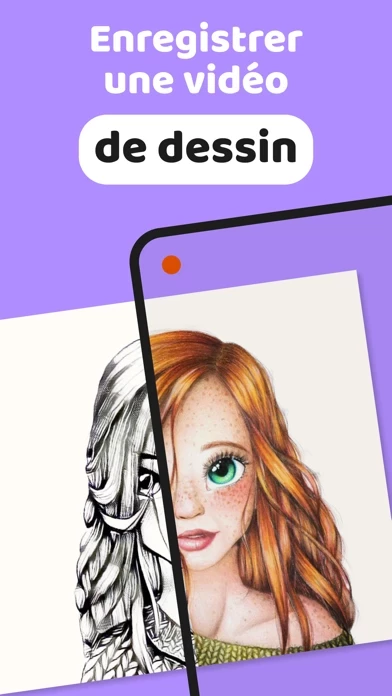
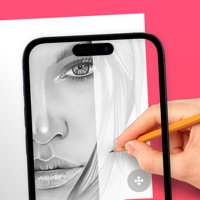
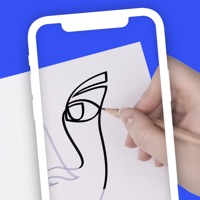
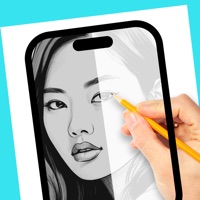
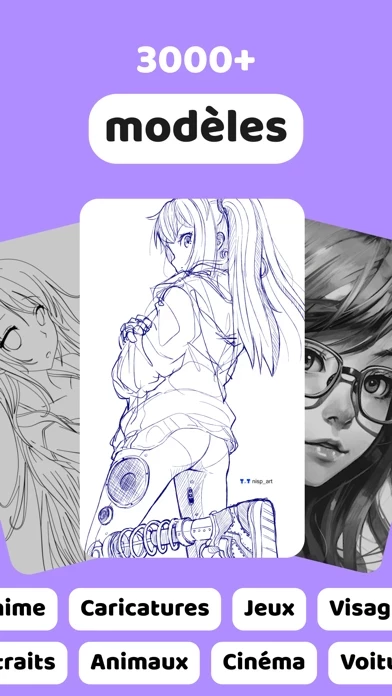
🏷️ About: Delve into the new World of augmented reality drawing! AR Drawing is a new breakthrough in drawing & Sketching with the implementation of AR Use your phone to project a template onto your paper and simply draw the lines With AR Drawing you will be able to: - Upload and draw your own art - Discover genuine art sections: Anime, Tattoos, Cars etc. - Record a video of your drawing process AR Drawing is the application th.



Overall Customer Experience 😎


🤬 Negative experience
100.0%

😎 Positive experience
0.0%

🫥 Neutral
0.0%

~ from Justuseapp.com NLP analysis of 20,656 combined software reviews.

Is AR Drawing How to Draw Sketch Safe?
AR Drawing How to Draw Sketch does not appear safe based on available data.
0/100

  Safety Analysis »»

Is AR Drawing How to Draw Sketch Legit?
AR Drawing How to Draw Sketch does not appear legitimate based on our analysis.
0/100


Read 56 Customer Service Reviews 😠💢

4.7 out of 5
No, Just no!

It doesn’t work, it won’t let me turn my screen around it’s so complicated and i just hate that! Please fix this then i will re download it! until then ARDrawingHowtoDrawSketch is just going bad for me.

wish I could give it zero stars

I would’ve given this 100 million stars but it keeps glitching out. You press this one button to make the picture big I guess and it wasn’t working. I tried restarting my phone 10 times deleting it and re-downloading it didn’t work and then I decided I’ll just go with it and then when I tried to turn the flash and the flash wasn’t working. it sucked so much please fix and I’ll give this 5 million stars.

“Bugs fixed”

ARDrawingHowtoDrawSketch is trash sorry at least for me it doesn’t work. Whenever I do the cup it either closes out or just doesn’t go through the paper…. “Bugs fixed” HAH! I think not… :( seriously though my art is trash and makes me wanna cry .. and well… it rhymes with pie. :)

It needs a left handed setting!

As someone who is left handed it was almost impossible to use left handed because you have to prop up the device and then the prop gets in the way. Now you might think to move the template over but no matter how far you move it this is still a problem. Another thing to note is that it needs more variety in the templates and just more templates in general.

Good but I don’t understand

It’s actually pretty good I just can’t get it to come onto the paper. For example I want to draw a dog and I only get a tiny dog I just can’t get it to my full liking I also don’t understand how to work the flash button or the other ones can you make a tutorial please ?

Please fix this

Whenever I show my camera, my screen is frozen

Actually free and basic, perfect.

Having never tried this type of app for transferring designs onto metal for engraving, I really wanted a free app to be sure this type of system will be workable for me. This fits the bill- only the most basic features, and actually free- not a demo, not limited with in-app fees, just free.

My one issue is that although there are only four buttons in the interface, I can only discern the function of two. The flip button and record/stop buttons become obvious when you press them, but the others had no effect I could see, and there’s no labeling or help section or any information whatsoever, really. If this works for what I need it to do, this is the type of deficit that would lead me to pay for a more fleshed-out app rather than simply sticking with this one.

AR DRAWING

Hi , ARDrawingHowtoDrawSketch was so good and I’m obsessed with it. If u wanna make so good drawings and paintings or sketches ARDrawingHowtoDrawSketch is for you .

It’s ok

But they need to work on it better

It was okay

It wasn’t the best but it wasn’t the worst I’m more used to using my own sketch’s

Ok so I put 4 stars because I really didn’t start using ARDrawingHowtoDrawSketch so that’s why I put a 4

Left handed

It’s a really good app but theres no option to flip the drawing, im left handed so i have to have it on the right side and it makes it impossible to draw without it upside down.

Other than that, great app.

Needs more options…

ARDrawingHowtoDrawSketch is rlly good but it needs improvement,first of all it has not the best drawing ideas, and I wanted to draw like pink panther or kawaii stuf like come on! Well anyways it’s free and no adds which is nice well PLEASE ADD NEW UPDATES PLEASE!

It did what it said it would

So I am overall pleased that it was free but what got me to write this review was the overall lack of focus it had, and before you saw “her phone is probably just old.” No it’s not it’s my phone I literally have the Samsung galaxy S6, so please expect wonky focus and a small selection.

Please fix other wise EPIC

I was about to draw and I open mine app up when I said everything up instead of it being a normal straight photo it was sideways and I couldn’t do it and it wouldn’t let me adjust it other wise amazing free and EPIC would recommend!

Better than the other apps!

So glad this is free! All the other apps need PRO to do anything this does. Go for this instead.

This app is actually free!

At the time of writing this review ARDrawingHowtoDrawSketch is actually free! No ads, no subscriptions, no times limits like, no locking out features unless you subscribe! I am so happy to have found ARDrawingHowtoDrawSketch after the one I had been using for years decided to go subscription only. Actually I like ARDrawingHowtoDrawSketch more because I can use my phones flashlight while tracing to make thing easier to see.

GET THIS APP, ITS AMAZINGGGG

When I saw it, it looked good and I saw some really good reviews so I got it and I drew easy, and it looks so cute! It worked perfectly and the quality is 🫶🏻. I was drawing me and my sister cause she’s leaving for college next month and she loved it. I’m so glad I have ARDrawingHowtoDrawSketch, I recommend ♾️/10!!

Best free app for drawing!

Was the first app I came across that will help you trace! I’m not one to “cheat” but I want to get my sketches done faster at times. Just edit your pic to black and white and start drawing! It’s super easy to use and free!!! No lies, I hate seeing those robotic reviews. Just download this fr!

Im so happy i downloaded

Im so happy I downloaded ARDrawingHowtoDrawSketch, it helped a lot and help pave the road for what I can draw now, I can draw things I used to be able to only draw on ARDrawingHowtoDrawSketch, I’m just so glad I found ARDrawingHowtoDrawSketch and I couldn’t be more grateful.

Absolutely amazing

ARDrawingHowtoDrawSketch is amazing. It has almost everything that you expect and you can even upload your own thing that you would like to draw. Doesn’t require you to pay anything or sign in you can just chose whatever you are going to draw and go straight into it. This is exactly what I wanted.

Free and simple to use

I went through a bunch of different apps and you all have subscriptions or payments, but all I wanted to do was transfer over my digital art to a canvas and I didn’t wanna pay for it. ARDrawingHowtoDrawSketch is very easy use and I like it a lot!!

Awesome

First of all it’s completely free and my drawings have gotten a lot better that my old drawings. I’d recommend buying it for those people out there.

Love the app

I love that you made the library photos of users you guys made a drawing that took me 21 tries to get it without the turn into 1 try love ARDrawingHowtoDrawSketch keep it up

Free

No subscriptions I used to use one but it now it’s subscription only so this one is all free only problem is while I’m drawing my phone turns off so if you could make your phone not turn off while drawing it will be a lot better

The best app I’ve ever seen.

ARDrawingHowtoDrawSketch is the BEST. And when I mean the best, I mean the BEST BEST. Most apps required a subscription to work, and the most popular ones didn’t allow you to import your own image. And as I was about to quit looking for an app, I found this one. It was so helpful and it helped me not draw what I want but get used to all the new head shapes and eye styles, even without ARDrawingHowtoDrawSketch and tracer thingy, I’ve learnt a lot. Keep up the good work.

Perfect

ARDrawingHowtoDrawSketch is free and very useful one improvement is that can you add a feature that you can zoom in to make it more detailed can you do that?

This is the best app

While I was drawing my first hard one I discovered today for the people that are left handed that you can rotate the picture and that helped a lot btw ARDrawingHowtoDrawSketch is the best o finally drew my first hard lucario drawing

Very helpful for beginner artists

AR Draw is such a helpful app when you want to draw something that’s really though for you find a picture upload it to ARDrawingHowtoDrawSketch and trace it! Ofc it gives you options to trace things already on ARDrawingHowtoDrawSketch . Y’all should totally check it out!

Better than expected

Went into ARDrawingHowtoDrawSketch thinking it was gonna be really crappy and hard to use, but turns out it just took a few try’s and messing with the pictures to get them to turn straight and messing with different cup heights so get the size picture I wanted. Overall I do like ARDrawingHowtoDrawSketch

This app is very good You should try this one👌🏻 You never regret 👌🏻

ARDrawingHowtoDrawSketch is very good You should try this one👌🏻 You never regret 👌🏻

really good!!

I’ve been using ARDrawingHowtoDrawSketch to make some last-minute teacher appreciation week gifts for my teachers. I loaded their photo into ARDrawingHowtoDrawSketch and drew them! ARDrawingHowtoDrawSketch is really great and can really help with anatomy and can save you some time!

Really good

Five seconds in and i see no ads no in app purchases and no interruptions.
Your a real one for making this. Id give you a 20 star if i could

No ads and! And free!!

ARDrawingHowtoDrawSketch is so good it has no adds and free It’s a very good example to start drawing hope you can try too !! ♡♡

Perfect app

I love ARDrawingHowtoDrawSketch because it is free and so much fun and it also shows you step by step of how you draw I love it 10/10❤️❤️

The only decent and free tracing app

No ads, no in app purchases or ridiculous subscription service.

Just a simple app to trace and draw using the camera. It works, it’s useful and it doesn’t try to scam you for money. Just a nice little free tool for drawing.

Really good app

All the other apps like this needs a subscription so im really grateful to see one that doesnt, now im addicted to drawing because of ARDrawingHowtoDrawSketch thank you for creating it.

The best app to draw

ARDrawingHowtoDrawSketch is the best thing every, it’s for free!

👍

This is a very good app for people with shaky hands, I’m now able to show off my drawings thag don’t look like a blob fish

Best drawling app

If it had a 10 star rating I would have picked a ten star rating. best app

I love it so much!

I recommend ARDrawingHowtoDrawSketch! You don’t have to pay for anything! It’s so good I’ll use it anytime when I don’t have any ideas for my dragon puppets! I can just take photo then save it and put it on ARDrawingHowtoDrawSketch to copy! Nothing is wrong with ARDrawingHowtoDrawSketch I just wanna say that it is the best drawing app that is free and doesn’t have any purchases

So good

No ad no subscriptions no money it’s amazing. I really recommend ARDrawingHowtoDrawSketch for any beginner artist as myself I recommend it it’s really good because I can use it to you can even submit your own templates to draw your cousin brother sister, mom, dad, aunt anybody it’s amazing I recommend it.

The best tracing game I ever had

It is so good One day I got a tracing game first it was good until I clicked a drawing it was making me pay but then I made the drawing big so I can draw it big then I drew it and it was so small on the paper this game is such better you should get it.

Best Ar drawing EVER!

This game is completely free with no ads and no time limit! I always got so frustrated when I was in the middle of drawing and it told me my time is up and I found ARDrawingHowtoDrawSketch and I LOVE it!

REALLY GOOD

so when I joined IT WAS FREE there was no trial it just lets you in and all you need is a cup that can hold ur item AND YOUR GOOD TO GO

Not bad

Not bad for a artist like me but I wanted to draw like anime anime like Naruto, One Piece, Demon Slayer and more.! But developers can you add or update to make more anime pls hope you read this.!!!

This is cool

Much more amazing then a tutorial cool!

It is free

I love it because it is free

Very good!

Easy to use, Lets you upload your own pictures and best part ITS FREE! You shouldn’t have to pay to learn how to draw it should be free I usually never rate stuff because I don’t have the time but all the other apps either don’t let me upload my own photos or charge me money. Thanks Draw Ar

Fun but needs a few more drawings

So it is the best app but a little more drawings to trace but ARDrawingHowtoDrawSketch is amazing omg like everyone should download this game if they need help drawing step by step so if you want to download this game do it you won’t regret it trust me!!!

I have a couple words.

ARDrawingHowtoDrawSketch is great because it doesn’t ask for a subscription so you can draw like three drawings and say you can’t draw until you sub

Great app

Amazing 🤩

I love ARDrawingHowtoDrawSketch so much it makes drawing so easy and fun. But The best part is that it’s free and there is a selection of different stuff to draw which just makes ARDrawingHowtoDrawSketch ten times better.

My honest review

This is an amazing app and compared to the other ones you don’t need a subscription to draw! I really recommend you get this free app

Loving it so far!

Downloaded a few apps like this one and it’s the best so far. It does exactly what I need, it’s user friendly, and it’s free.

BEST FREE APP!!!!!

ARDrawingHowtoDrawSketch is free and VERY good for AR drawing

GREAT DRAWING APP

So I have never really been that good at drawing and I’ve tried AR sketching things before but they’ve never really worked out for me but this one this one’s different it’s incredible. It’s easy has a few steps and I think it looks really cute.


Is AR Drawing How to Draw Sketch Safe? 🙏

AR Drawing How to Draw Sketch does not appear safe based on available data. JustUseApp Safety Score for AR Drawing How to Draw Sketch is 0/100.
This assessment is based on our NLP analysis of 20,656 user reviews. Combined with the app store average rating of 4.7/5.

Safety Analysis

83.9% of users say app is safe 👍
83.9%

11.3% of users have some concerns ⚠️
11.3%

4.8% of users say app is risky 🚨
4.8%


Is AR Drawing How to Draw Sketch Legit? 💯

AR Drawing How to Draw Sketch does not appear legitimate based on our analysis. Our NLP models processed user feedback to estimate legitimacy. JustUseApp Legitimacy Score for AR Drawing How to Draw Sketch is 0/100 .
This conclusion is based on analysis of 20,656 user reviews.

🔏 Privacy & Data Safety

AR Drawing How to Draw Sketch collected the following data from you:

  • Data Not Linked to You:
    • Identifiers
    • Usage Data
    • Diagnostics


How was your experience with AR Drawing How to Draw Sketch? Post a Review


Features

AR Drawing is the application that allows your to draw stunning arts and images, learn how to draw and teach others.

AR Drawing make sure that drawing is suitable for everyone - starting and professional artists as well as kids and parents.

- Discover genuine art sections: Anime, Tattoos, Cars etc.

All of this is available thanks to augmented reality added in the app.