T20WC Tickets Reviews
Published by SecuTix on 2024-05-18🏷️ About: The ICC Men’s T20 World Cup 2024 will be played in the West Indies and USA from 1-29 June 2024. Download the official tournament ticket App to be part of the action.

🏷️ About: The ICC Men’s T20 World Cup 2024 will be played in the West Indies and USA from 1-29 June 2024. Download the official tournament ticket App to be part of the action.
I have purchased tickets using Apple Id (hidden email feature) but when I use same email I am not getting confirmation code and not able access the tickets one week before the match. Please do something about this.
Bought the tickets using Apple ID but the ticket app does not support Apple login. No way to access my tickets. Please fix this !
This is an app with worst codes, I can see my tickets assigned to me, I can see ROW # gate # SECTION # , but there is no option to PAY !! What kind of code are you using that’s not making it sync with ICC!!
Really bad and un-intuitive app. This is after they are making millions on these tickets! Shame!!!
I am unable to access my tickets as i booked them via apple id.
Please enable login via apple.
ICC should hand over the ticketing process to someone perhaps even slightly competent.
I am still waiting to get T20WCTickets to work. All I see is the Home Screen and nothing happens!
Cannot access tickets bought using Apple login. App does not provide for Apple login! So spent money on tickets I cannot use!
No ticket provided, despite paying for it by more than 6 -8 weeks. T20WCTickets also automatically blocks negative reviews.
I bought the ticket and not even getting the confirmation email. How can I view my ticket?
I chose the one dollar extra for the ability to get a print at home ticket. The expectation was that it would be sent via email to be downloaded on the mobile device or printed physically. I chose this because I don’t want to have to create another account for a one off event which means it’s just another login I have to manage and app i have to download. I also chose the option because the ticket is for someone so i just wanted to forward them the ticket. Now, I’m forced to use T20WCTickets , complete a profile is mandatory, otherwise I can’t access the ticket I selected that should be print at home and not accesed via an app. If this was the end goal, just don’t have the print at home option to begin with!
Signed up with Apple ID and bought three event tickets but no access to ticket as of now (May 28th). My event is on June 1st and no access to tickets. PLEASE FIX IT.!!!! Trying calling ICC - no response. Tried calling developer (SecuTix) - Florida phone number doesn’t work.
This is the worst made app I’ve ever used in my entire life.
It feels like it’s been intentionally designed to be confusing and hard to use.
It asks for an INSANE amount of irrelevant personal information as well
T20WCTickets is not allowing me to access my tickets. The screen doesn’t allow for any prompts and I’m unable to open it. This is unacceptable because I brought tickets I’m unable to get to. These aren’t cheap tickets.
Please fix.
Tried to buy parking tickets and now I am stuck on a screen where they ask me to associate my OpenId connect account which I don’t remember creating. On top of that, there is no option to reset password. So I am just not able to buy the parking tickets. Will be what happens when I reach
Despite forcing the switch from Print at Home to App delivery, they haven’t integrate Google account login which is where my tickets are linked. Concerning the first game is 2 weeks away and no access to tickets.
Furthermore, a few days ago via the site, seats were allocated but now they aren’t showing as ready either.
Step it up ICC ticketing team.
It worked just fine for me. No issues receiving my tickets
Overall T20WCTickets is great but I wish the map within T20WCTickets showed where where our seat is and they should have added the option to add tickets to apple wallet.
Not sure what is with all the negative feedback, this all is very simple to use. It’s great, easy to transfer to tickets. Visually looks good. No complaints.
I got my tickets from Vivid and got sign up info for T20WCTickets from T20wc. Was able to login with email id I used to do the purchase and after a short registration process was able to see my tickets
T20WC Tickets does not appear safe based on available data.
JustUseApp Safety Score for T20WC Tickets is 5.1/100.
This assessment is based on our NLP analysis of 39 user reviews.
Combined with the app store average rating of 2.3/5.
T20WC Tickets does not appear legitimate based on our analysis.
Our NLP models processed user feedback to estimate legitimacy. JustUseApp Legitimacy Score for T20WC Tickets is 5.1/100 .
This conclusion is based on analysis of 39 user reviews.
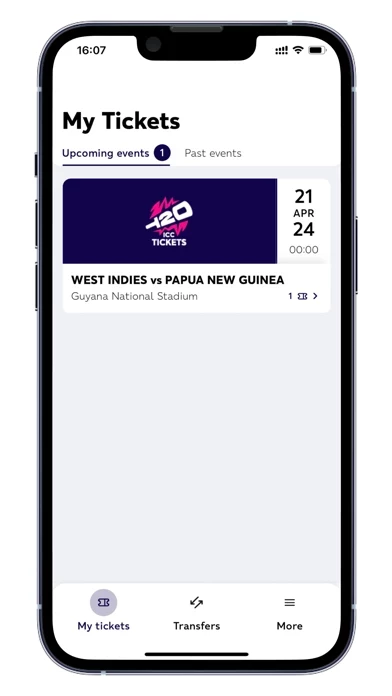
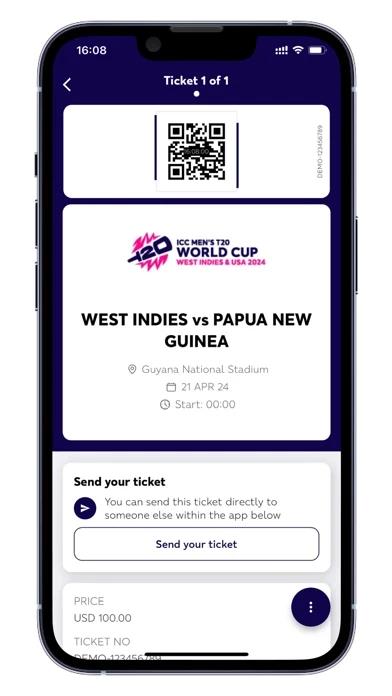
- Enter the event using your digital ticket in a quick and simple way by presenting your QR code on arrival.
The ICC Men’s T20 World Cup 2024 will be played in the West Indies and USA from 1-29 June 2024.
Download the official tournament ticket App to be part of the action.
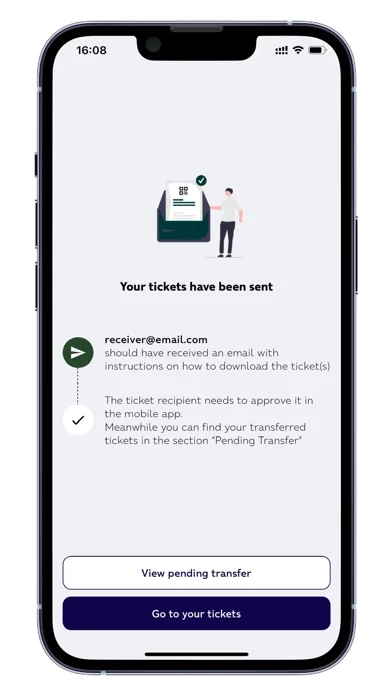
- Transfer tickets to friends or family through the ‘ticket transfer’ option.
- Download tickets instantly to your smartphone and keep them with you anywhere you go.