Trace Table - Light Box Reviews

Trace Table Reviews

Published by on 2025-12-11

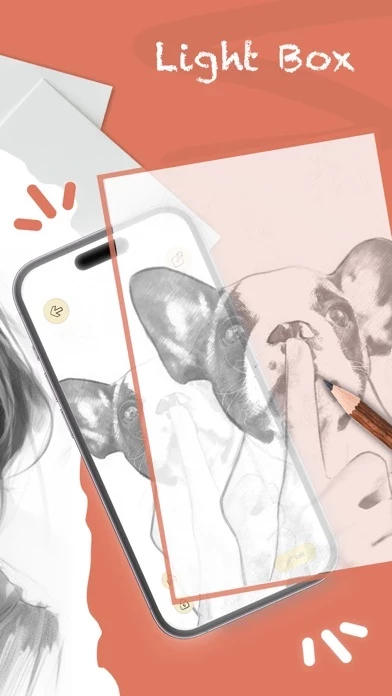
🏷️ About: A simple, effective light box for tracing drawings and artwork. Trace drawings, photos, tattoos, flash, lettering, inking, line work, comics, homework, anything! Trace Table maximizes your screen brightness, so the lines are easy to see.



Is Trace Table Safe to Use?

We Investigate the app owner's website (Aestivalis.it), verify their legitimacy, and uncover hidden scams and complaints.


Overall Customer Experience 😎


😎 Positive experience
66.7%

🤬 Negative experience
33.3%

🫥 Neutral
0.0%

~ from Justuseapp.com NLP analysis of 9,370 combined software reviews.

Is Trace Table Safe?
Trace Table - Light Box is very safe to use.
66.7/100

  Safety Analysis »»

Is Trace Table Legit?
Trace Table - Light Box looks authentic and legitimate.
66.7/100


Read 34 Customer Service Reviews 😠💢

4.4 out of 5
Slider doesn’t do anything! UPDATE

Previous comment: Just that.... has anyone had any luck using the slider? I have tried every imaginable combination of functions, but I do not see where the slider has any effect at all. Clicked on the link to the developers web site, but that was no help as there is no way to contact the developer. Does TraceTable work? Yes. Is it supported? No. Would I buy it again? No.

Just downloaded the update. The slider now works! That helps a lot.

Two problems:

1. The width of the slider went from wide to narrow. Makes it harder to use. Needs to return to a better width.

2. When using the slider, it does not brighten or darken evenly. From being light, it seems to take effect on the right side of the image first. And vice versa. Inste needs to brighten or darken evenly.

Programmers - please fix!

If you wanna draw on the image projector, you’re gonna have to pay

So I am terrible at drawing so I got TraceTable so I could draw better and I first love they wanted me to pay I’m not going to pay and second of all when I went to the image projector it says by premium or subscribe like I’m not going to subscribe to the game that I just gothow would I even know how the game really is so I’m warning you if you wanna draw don’t get this game

Used to be simple and good.

I don’t need another app trying to do everything. This used to be bright enough to use tracing paper over 20lb printer paper. Now, it can’t. Quite disappointed that i have to upload an image and use only tracing paper. Totally NOT what I want. I use hand made pencil templates and create conceptual iterations for hand lettering projects. Useless now. Deleting after this review is posted.

Disappointed

I’m very disappointed that Trace Table has changed from what I purchased. It was so simple and exactly what I needed: load a photo, play with black and white version of it, and lock it for tracing. Now it only locks. And, seems to just want to sell me the expensive pro versions - that I don’t need or want. It would be nice if they kept the original as is and created a separate pro version.

Very aggressive to charge a ridiculous yearly subscription

I can’t comment on the features but am disgusted by the blatant effort to get you directly into a yearly subscription. I was aware of the in-app purchases but you don’t even get a chance to try anything out before you are confronted with the requirement to purchase. And a yearly subscription for $5 a year for what? Switching a colored light? There are plenty of free and 99c apps so I would advise to stay clear of this one.

Frustrating App

TraceTable is very frustrating as it doesn’t have the option for rulers, so if you need the image to be a certain size to trace, it doesn’t work.
The locking ability is kind of a joke. My palm was constantly opening other apps or closing TraceTable.
My advice is to just get a cheap tray table, or use a glass tabletop with a light underneath, save yourself time and frustration.

What happened to the original?

I open it up and now it’s forcing me to use an image?! Like, what happened to the original thing? I bought TraceTable and used it all of the time. It WAS like a blank screen. I could use the screen as a light for my paper images. I don’t want to have to upload anything.

Good but could be better

Just before this current update the options to change the filter where faster and smaller. Now the lock button is bigger I keep hitting it and it makes it allot harder to get the outline and landscape has also become more difficult. Overall it does the job and the projector is a nice feature but it deserves some more tweaks.

Useful app…

One major complaint, there should be a way to completely lock the image. Effective for the most part, but as others mentioned, one can accidentally close/minimize TraceTable or jog the image inadvertently by accidentally actuating the home function… Consider a full lock, so when the image is locked, the user cannot minimize or close TraceTable without unlocking the image. Not sure if that is possible, but would get 5 stars from me if updated in such a way.

Great but one problem

I love trace table. It’s awesome. But there’s one problem whenever I’m in digital paint, both on my phone and iPad. I’m tracing a picture and I make a mistake, I click the undo button and the mistake and ALL OF MY FREAKING HARD WORK get undid. 😭 please fix this so I don’t have to keep doing so much hard work and take so much time over and over.

It’s ok.

I think TraceTable is pretty good, overall. But may I make a suggestion to add flashlight on the phone without having to worry about using a lamp or overhead light to see what I’m doing when drawing on the paper. And possibly an AR, so that the image can place itself on the page.

I know you’ve been working hard to make TraceTable, but there’s still room for improvement, but you could at least add the flashlight feature.

Thank you for taking the time to read this.

Pretty Good! But……

Hi, so I downloaded TraceTable because I’m a very bad drawer, I thought of the thing where you put your camera and you see the drawing and you can trace it, but for that you need the subscription, I got mad, but then I saw the light thing, and I was happy, but not as happy as I would be if the camera one was free too, maybe at least let people have a few times to try? But if you give it for free, you won’t be sorry and you will be hearing from me with a 5⭐️ review! Tysm!

New update

I’ve used this for a very long time to project images and fonts for my cookies, but with the new update, it doesn’t allow me to move my image without it resize. Before I could slide it around to where I needed it.

Hello

Hello I love TraceTable I use TraceTable all day long for my hobby and I think it would really be great if could create a flip app to flip words so when transferred to paper and applied to a surface it faces correct way phone don’t have feature in camera could we have option in app

It’s pretty good

Honestly i give it a 4. I have to pay for EVERYTHING. That’s why I’m not rich because I spend my money on stupid apps. The parts I don’t have to pay for I really liked

❤️LOVE IT SO MUCH❤️ 10/10 SUPER EASY ✅✅✅✅

TraceTable is amazing to use because it is so easy and also fun. the screen lock works very smoothly. You can also use TraceTable to learn how to draw easily and In a more fun way then maybe taking and paying for other expensive art classes. Another thing is that it is 100% free except for the $2.99 dollar V.I.P pass which is very cheap and works very well. It gives you so many options to draw and learn. You can still easily use this amazing app without paying $2.99. Another reason why I absolutely love TraceTable is because you can adjust the lighting or the size and angle you want the picture to be. Sometimes I just use TraceTable to relax because this is also very calming and satisfying. These are just some of the million reasons why I like TraceTable but overall definitely recommend. Super easy and fun to use. 10/10 👍 ✅

Great app/ recommend!

I really recommend TraceTable. All images have to be paid for but if you download an image of Apollo google and use it it works.
Highly recommend using TraceTable for your drawing/sketching skills.
I would love no in app purchases.

Awesome app

The last time I used TraceTable, it was a lot cheaper, but honestly it was really undervalued for all the awesome features. I don’t draw a whole lot anymore but I still find it indispensable and absolutely worth the cash.

it’s kinda cool but I have no money to buy project image…

So y’all I ha have no money and I’m sad BUT the grateful reason that I drew 38 sketches and it was pretty cool I showed my friend and she was like “omg that so amazing ur an artist” pretty much stuff going on that app it would be the top AI drawings and yeah that’s all thank you.

It’s amazing! ❤️🤩

I love TraceTable it is totally amazing! I can lock in what I want to trace to the screen doesn’t move and the brightness is high so you can see! It even lets you pick your photo you want to trace! I recommend TraceTable to every drawer or beginner drawer! I’m an artist myself and even I need help with drawing sometimes so this is really helpful! 10/10❤️✨

Perfect for inking art!

I’ve been using my iPad as a makeshift on-the-go tracing table to transfer my digital pencils to bristol board to ink my final drawings. Previously, I had to trace with the Apple Pencil while keeping my fingers and palms lifted from the tablet, so as not to shift the digital art, which was VERY difficult and usually failed every ten seconds or so. I needed a program that would lock my image in place so I couldn’t accidentally move or zoom in/out with my hand while tracing with the pencil.

TraceTable is PERFECT for what I needed, immediately simple to use, and has several additional functions that I haven’t used yet, but will probably be very grateful for when I do! I’m so grateful TraceTable exists!

Crafty gift from the heavens!

I originally downloaded TraceTable in order to do some hand drawn art. However I discovered another use for it when I was going through some DIY Clothing TikTok‘s and I realize that I could copy images onto tissue paper to embroider onto my clothes.

This is really great for anyone who has seen a TikTok DIY where they magically put images onto clothes but don’t tell you how. I was able to use all the features, the light box, the flip, the lock, and make different sizes of the same image for different pieces of clothing. I’m excited to put an anatomical heart on a sweatshirt, on one of my baseball caps, and on a tote in the future. I will also be making stencils for some bleach art.

Thank you Kevin! I am going to add myself into the people that appreciate you making TraceTable, in addition to your wife!

Great app. Worth the dollar

As an illustrator TraceTable has helped a lot. Easy simple to use. I love the ghost feature that turns the picture into a black/white outline you can adjust the contrast on! Makes tracing easy

Simple and easy to use

Allows you to lock the screen so your image won’t move around while you trace it. You can also resize or mirror the image vertically.

Incredibly useful

Several great features. You can lock (and unlock) the image with one click so you don’t move the image around when you try to trace. Yes, iOS has a feature to lock the screen (I have been using it) but it is much more cumbersome to use than TraceTable. You can also reorient your image (horizontally to vertical etc.) just using your fingers to rotate. Yes, you can do this in iOS also, but again, much more cumbersome to do. Lastly, one click switches your image to a line drawing, again making it much easier to trace. Well worth the small fee.

Great but it doesn’t prevent the screen from dimming

It’s great for trace but I’d like an app that I can also use as a reference without having to touch the screen. Someting that would override the sleep settings on my phone

Better than others

TraceTable is honestly great, other apps require you to pay in order to trace 😒, but not on TraceTable. I highly recommend TraceTable.

Works great!

TraceTable performs just as advertised. I love that it locks the image so that I can't accidentally resize or move it mid-trace.
The screen is bright enough for even thicker white paper, and there's even a cool auto trace-ish function. Definitely worth the low price.

Just does what you want

It’s a magical moment when you hope there’s an app for that and then there just… is! Reminds me of the good ol’ days in TraceTable Store. No ads, just $1, just useful.

To the developer: thanks for making this. 🙂

I never write reviews but this is so useful I have to

In embroidery circles, we are always looking for ways to transfer patterns to fabric and this has by far been the easiest way. I pull up the PDF and put it directly into Trace Table and it works perfectly. I’ve recommended this no less than 50 times and I will never stop. Huge help!

Too Cool!

What a wonderful idea! This is a great way to improve your drawing skills! TraceTable can be used for all sorts of things. It should come included with your iPad! I dare say kids can come up with all sorts of uses. Generate a list!

I think it is SO admirable that these developers haven’t charged even a little bit more. I’m not alone in saying we’re tired of being taken to the cleaners by just some of these business people.

I just now installed Trace Table and I can guarantee I’ll be using it a great deal.

One caveat… I almost wrote on my screen with a black pen. I had intended to grab my Apple Pencil!

Terrific job! Keep up the great work!!!

Now I can trace on iPad

Before I got TraceTable I would open a photo that was mostly white space, but it always giggled around or would close when trying to draw. Then I searched, how to use iPad as a trace box and found out that 'there's an app for that'. TraceTable works perfect. Thank you very much. Well worth 99cents too, as a small stand alone light box could cost twent in thirty bucks.

Brilliant and useful

This is a great idea! You can take pictures or upload pictures then lock them to trace right off your phone or iPad. Saves time. With thick paper you can still make out the overall structure of the picture. Helpful for watercolor sketching to get the idea right without spending too much time and losing the moment. Thanks for making this!

I LOVE THIS APP

I cannot describe to you the amount of times ive tried to trace something on my phone and the image would move and mess everything up before TraceTable. TraceTable has a custom light box option where you can choose your own image and LOCK THE SCREEN so that it doesnt move while you're drawing unless you unlock it. I AM SO HAPPY I FOUND TraceTable I LOVE IT FOR ALL MY ARTS AND CRAFTS!!!


Is Trace Table Safe? 🙏

Trace Table - Light Box is very safe to use. JustUseApp Safety Score for Trace Table is 66.7/100.
This assessment is based on our NLP analysis of 9,370 user reviews. Combined with the app store average rating of 4.4/5.

Safety Analysis

78.8% of users say app is safe 👍
78.8%

11.2% of users have some concerns ⚠️
11.2%

10% of users say app is risky 🚨
10%


Is Trace Table Legit? 💯

Trace Table - Light Box looks authentic and legitimate. Our NLP models processed user feedback to estimate legitimacy. JustUseApp Legitimacy Score for Trace Table is 66.7/100 .
This conclusion is based on analysis of 9,370 user reviews.

🔏 Privacy & Data Safety

Trace Table collected the following data from you:

  • Data Used to Track You:
    • Identifiers
    • Usage Data
  • Data Not Linked to You:
    • Identifiers
    • Usage Data
    • Diagnostics

Payments 💸

**Pricing data is based on average subscription prices reported by Justuseapp.com users..

Pricing Plans Amount (USD)
Weekly Premium $2.99
Weekly premium $4.99
Weekly Premium $2.99
Weekly premium $4.99
Monthly Premium $9.99
Yearly premium $69.99
Yearly Premium $49.99
Monthly Premium $9.99
Yearly Premium $49.99
Yearly premium $69.99


How was your experience with Trace Table - Light Box? Post a Review


Features

“I originally made Trace Table to help my wife draw cartoons on notes to put in our son’s lunchbox.

Trace Table maximizes your screen brightness, so the lines are easy to see.
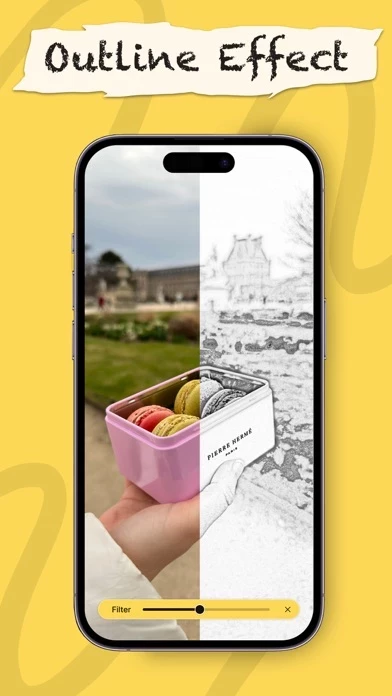
Watch as your creative thoughts take shape on our digital canvas, transforming into a masterpiece before your eyes.

Trace table now comes equipped with our new AR Image Projector.

Simply position your device above the canvas and view both the image and canvas directly on the screen.

  Contact Support